Operating System Shells and Permissions
Learning Outcomes
After completing these activities you should be able to:
- Describe Moore's Law as it applies to the Computer Architecture
- Explain the purpose and functions of an Operating System
- Describe the services an OS provides
- Identify the methods in which users can access OS services
- Access the Windows PowerShell application
- Remotely access a Linux shell using SSH
- Distinguish terminology used for accessing applications, options, and functions within the console
- Perform shell commands on a local system to accomplish common file system tasks
- Perform shell commands on a remote system to accomplish common file system tasks
- Identify the basic properties for permissions within a Windows or Linux environment
- Understand the use of terminologies related to this class
Moore's Law
device: past, present, future. Courtesy of Intel.
Processing power continues to increase with the density of transistors on an Integrated Circuit (IC) doubling every two years based on a principle called Moore's Law. Since postulated by Intel co-founder Gordon Moore in 1965, this prediction has held steady through innovations that continue to push physics beyond what could be imagined to this day. What was once two-dimensional, 90 nanometer (nm) strained silicon wafers that landed Apollo XI on the moon has morphed into the ability to cram over 100 billion transistors using extreme ultraviolet (EUV) lithography to fabricate a die that combines three-dimensional stacking and other advanced manufacturing processes to deliver processors such as the Apple's M1 Ultra Chip and Nvidia's RTX 4090 Graphics Processing Unit (GPU). By 2030, processors are estimated to pack 1 trillion transistors per chip (Kelleher, 2023).
These hardware improvements are directly seen with the Operating Systems (OSs) ability to also exponentially improve. As you progress through this class, keep in mind the direct relationship the OS has with advancements in hardware capabilities.
Operating Systems
runs applications from the system and user.
OSs are one of the components of Computer Architecture, as discussed in a previous class. The OS is software that manages all the other programs running on the computer and acts as an intermediary between those programs (or the user) and the physical machine. Student issued laptops will have Windows, a smartphone may have iOS or Android, servers might run Unix or one of the many flavors of Linux. Just remember that users and typical programs do not access or manipulate resources, like storage or peripherals, directly but requests the OS to do so on its behalf.
System Services
Because the OS manages the computer and all the programs that run on the computer, it is of critical importance to security. It can restrict what Programs and users do to make sure they can't cause too much trouble on the system. Conversely though, when OSs have security flaws, it can be a significant problem for businesses and Information Technology (IT) organizations.
You might wonder what OS gets used for something like NASA's Curiosity robot, which is exploring Mars as we speak. It's not one of the major PC or mobile OSs we talk about in ! Check out this article which describes the hardware and OS on the Curiosity. It includes a 10+ year-old CPU, and an OS that was initially released in 1985, but it has to be able to handle extremes in temperature, radiation, navigate an alien world on its own, and communicate with engineers so far away light itself takes 14 minutes to make the trip ... one-way!
The OS provides services to Users and programs — it does things they need done that they cannot or are not allowed to do for themselves. Some important kinds of OS-provided system services are:
- File Operations — the OS manages all the different storage-related peripherals, like hard drives, flash drives, DVDs, etc. The OS can create, modify, read and destroy files on behalf of other programs.
- Network Connections — the OS can actually send or receive data to/from a computer's Ethernet port (wired) or WiFi radio (wireless). A program that wishes to send data over a network asks the OS to do it on the program's behalf.
- User Accounts, Permissions, and Logins — the OS ensures that users log in properly, and that they can only access the things they're supposed to. Knowledge Check: What part of the CIA-triad is applicable to users logging into a system?
- Processes — more about this below. The important thing here is that the OS manages the programs as they execute, scheduling when each program gets to use the CPU to progress in its instructions.
The OS generally provides three ways for programs and users to access its services:
- The GUI — GUI stands for Graphical User Interface and is the graphical or image-based users interact with through inputs for associated peripherals, such as using your fingers on a touch screen or clicking on a mouse to open an application. For example, in Windows you can right-click on a file name in the file browser, choose the "rename" option in the resulting menu, type in a new name, and then press enter. This asks the OS to change the file's name on the hard drive for you. The GUI is an OS interface designed for users and not as much for programs.
- The Shell — The shell allows commands for the OS to be entered in a Command Line Interface (CLI). Shell exercises are provided in this class for you to begin learning how it's used. The shell is an OS interface for both programs and users.
- The API — API stands for Application Programming Interface. It is a very direct way for an executing program to ask the OS to do something on its behalf. The API is an interface exclusively for programs and may also be accessed through a web interface. An opportunity to work with APIs will be provided later in the course.
Although you are probably only familiar with using the GUI to access OS services, understanding and using shell will be important for this course. That importance stems in no small measure from the fact that the shell is an interface to the OS for both users and programs alike. The OSs we'll use for this course are Windows and Linux, which will be the next item covered in this class.
OS Shells
Windows Shells
The advancements in computer hardware also allowed for improvements in software. With command-line operating systems, like Microsoft Desktop Operating System (MS-DOS), released in the early 1980's, the Windows GUI wasn't launched until 1990 using an 8086 16-bit processor. Today's 64-bit processors allow for faster, more efficient, multi-thread capabilities but many of the underlying technologies within the OS haven't changed since the 2000's (i.e. the system registry for the fellow nerds that may be reading this).
For the upcoming Lab 2.1, Windows Operating Systems, you'll familiarize yourself with some of the GUI components and navigation but primarily for comparing output provided by shell commands. A shell simply allows a user to interact with the OS by running input commands that may result in outputs sent to the screen. By default, the Windows OS boots into its GUI, which is the color images you see and interact with on a regular basis. The Windows Start menu is a graphical element used to access additional programs and is in the lower left corner of the taskbar. Throughout the different versions of Windows, the Start menu may look different but its purpose and function are all the same.
A shell is the program that enables a user to interact with the OS, the console is the output or screen that displays information, and the command line is where commands are entered or input provided by the user. The CLI can also be referring to the shell or console and all of the terms may be used interchangeably on this site, in lectures, or within the assignments provided.
Activity: Command Prompt
The Windows OS has two different programs that can be used to access the shell (1) command prompt and (2) PowerShell. This course has been updated to use PowerShell but you may take a quick peek at command prompt and its functions by executing the following instructions:
- Click on Windows Start
and type
cmdfollowed by the↩ Enterkey. - Select the Command Prompt app and a new window should appear.
Note: Command Prompt is the name of the application but a prompt will be where commands are submitted. The illustration of a console window below shows a prompt containing the current working directory and ending in the > symbol.
Microsoft Windows [Version 10.0.22621.1992]
(c) Microsoft Corporation. All rights reserved.
C:\Users\m9999> - Type
echo "Hello World!"followed by the↩ Enterkey and you'll see the message appear on the screen. - Type
color 02followed by the↩ Enterkey and see what happens to the console! - Now type
title Hacker Consolefollowed by the↩ Enterkey and look at the upper left corner of the window. - What command do you think you would type to 'exit' the program?
Windows Ownership and Permissions
Local Users and Groups
Windows local user accounts are stored in the Security Account Manager (SAM) database located in C:\Windows\System32\config and password hashes stored in the system registry HKEY_LOCAL_MACHINE\SAM. The default administrator account for the Windows OS is called Administrator and comes standard when installing any Windows OS for the first time. Many systems come with default administrator accounts and it is vital that any default usernames and passwords are changed! The Windows Registry is a hierarchical database that contains configuration settings for the Windows OS, kernel, drivers, services, and programs that may store values that restrict access to kernel mode.
Why is your account not in the local users group on your computer? Because it's a Windows Active Directory (AD) account under the academy domain. In this case, your user account is an object located in AD and not the local system. All of the permissions and objects are stored on the AD server.
accounts configured for the system but student issued computers are part of a
Windows Active Directory domain, where your accounts are managed.
- Click on Windows Start
computer managementfollowed by the↩ Enterkey. - Click on Windows Start
file explorerfollowed by the↩ Enterkey. Right click on This PC and select Show More Options, then Manage.
Directories, Files, and Programs
There are several access control methods used in cyberspace to determine if a user has permissions to conduct certain actions on a system. Microsoft describes access control for Windows as the process of authorizing users, groups, and computers to access objects on the network or computer. Objects can be files, directories, user accounts, and more. To keep things simple, stick to files and directories in a file system. Some of the common permissions seen in Windows include:
- F: Full Access
- M: Modify Access
- RX: Read & Execute Access
- R: Read-Only Access
- W: Write-Only Access
the name of the computer preceding \ followed by the
username, whereas domain accounts will typically show
the domain preceding the \ followed by the username.
PS C:\Users\m9999\Documents> icacls .\Nimitz.txt
.\Nimitz.txt NT AUTHORITY\SYSTEM:(I)(F)
BUILTIN\Administrators:(I)(F)
ACADEMY\m9999>:(I)(F)
Successfully processed 1 files; Failed processing 0 files
C:\Users\m999\Documents>The OS has two modes in which it operates, Kernel and User. Kernel mode provides the highest privileges for access to critical operations required for the program to function, from accessing memory, disk, processing time, and more. User mode limits what can be done on the system based on access controls, often restricted to basic functions for users to interact with the OS and hardware. When running applications, such as command prompt or PowerShell, it runs in user mode but even when using administrative privileges, it still limits functions within the user mode space.
Linux Shells
Linux has a complicated history since its initial deviation from Unix, initially discussed in the Intro to Cyberspace Domain class. There have been hundreds of flavors, or distributions (distros), of Linux since its initial release in 1991. The common distributions today include Debian, RedHat, and FreeBSD. Ubuntu and Kali are additional distros of Debian, or Debian-based, while CentOS and Fedora are RedHat-based distros. These are just some of the maintained distros, with many more that are no longer supported and ended up fading away into history (i.e. not supported with updates to fix bugs or patches to fix vulnerabilities).
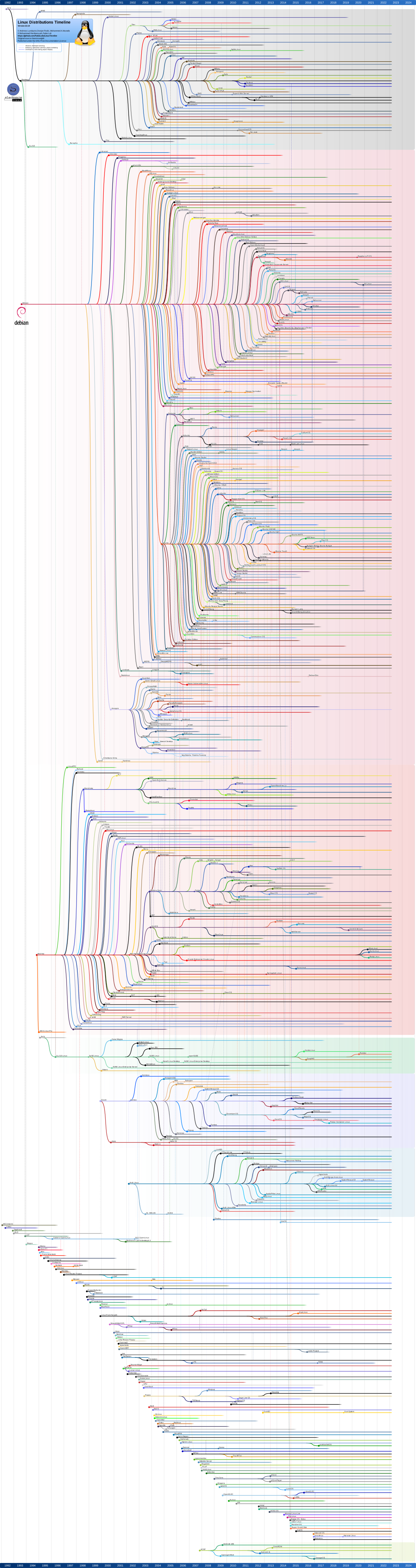
Click on the image to zoom into the full tree.
There are currently 10 official Ubuntu 'flavors' (distros) and 3 unofficial flavors as of Aug 2024. So distros can have distros that branch out into further specialized OSs. For example, Edubuntu was modified and designed to support preschool, primary, secondary and tertiary educational institutions; Lubuntu and Xubuntu are intended for use on less-powerful computers or those who seek a highly efficient desktop environment on faster systems; and Ubuntu Studio focuses on open-source applications for multimedia creation aimed at audio, video and graphic editors. The Linux workstations in our labs on campus all run Ubuntu Mate (pronounced "mah-tay").
Linux today refers to just the kernel, or the program at the core of a computer's operating system that is always resident in memory. On its own, the linux kernel isn't particularly user friendly, as it only contains the bare minimum needed to run the operating system, and is designed to run from memory. There is no way to "install" new software. To do that you would need a package manager. The combination of the linux kernel with a package manager is referred to as a linux distribution. It is very common for distributions (distros) to also include a Desktop Environment (DE) which provides a graphical user interface (GUI). There have been hundreds of flavors, or distros, of Linux since its initial release in 1991. The common distributions today include Debian, RedHat, and SUSE. Ubuntu, and Kali are also distros that are Debian-based, because they use the Debian package manager. Additionally, CentOS Stream and Fedora are RedHat-based distros. OSX (and its Darwin kernel) is FreeBSD-based. (Note: FreeBSD is an entirely different code base, and uses a different software license, and is not Linux-based). These are just some of the maintained distros, with many more that are no longer supported and ended up fading away into history (i.e. not supported with updates to fix bugs or patches to fix vulnerabilities). Ubuntu is owned by its parent company, Canonical, and RedHat is owned by RedHat (a company with the same name as its primary product). Both Canonical and RedHat make money off of 'free', open source software by selling enterprise support contracts and extended software and vulnerability management.
As far as what's used here in , you'll become familiar with Ubuntu Server, which will run Apache to host your websites, and Kali, which will be leveraged to exploit internal systems to conduct cyber attacks, both of which are Ubuntu-based distros!
|
|
Is your smartphone a computer? Did you know that it requires an OS? Since we're on the topic of Linux, an iPhone is similar to OSX in that it's based on Darwin(BSD). When AndroidOS was developed in 2008, it deviated into its own distro to establish an Android Open Source Project (AOSP) platform based on a modified Linux kernel.
Activity: Remote Linux Shell
In order to access the Linux server, you'll need to remotely connect to the shell using an application called secure shell (ssh). Follow the steps below to use PowerShell to remotely connect to the server:
- Click on Windows Start
powershellfollowed by the↩ Enterkey. - Select the Windows PowerShell app and a new window should appear.
- Type
ssh m9999@followed by the↩ Enterkey. Replace '9999' with your own alpha!
Note: If this is the first time you are connecting to the server, the message below will appear: - Enter your password but note, ***you will not see anything as you type.*** Note: Use the domain authentication password. If you violate the password policy, unlock your account using the Password Portal.
- Once authenticated to the server, a prompt that ends in '$' will be displayed. Welcome to the Linux command line!
- If that is not the case, return to step 3 and review what went wrong. If you are good, enter
hostnameto see the name of the computer you are connected to. If it returns with a value beginning with ward-rweb then you are connected to the remote system! - Type
uname -vand it should indicate that the OS is Ubuntu. - Now close the connection by entering
exit. - To make sure the connection has been closed, verify the hostname by typing
hostnameand it should return your computer name similar to WK0XX0000SY0MID format, indicating that you are now back on the local shell.
The shell will often NOT respond with any output when entering valid commands but remember that computers are not able to understand the intent of a user and will only do what it is told. If there is a problem with how a command is formatted, the shell will return a syntax error or if it is formatted correctly but the system is not able to complete an action, it will return an error. Be aware when the shell returns errors as that is the only way for the system to communicate to the user when a problem occurs with a command.
yes followed by the ↩ Enter key.Just as Windows has command prompt and PowerShell, Linux has more than one shell available. The default shell accessed is the Bourne-Again SHell, or BASH. Other shells available on the system include KornShell (ksh) and C Shell (csh). Building out the Linux extra credit used bash scripting to create the thousands of files and folders without having to enter commands over and over again to create the capture-the-flag scenario.
When connecting to a remote system, it's important to know what the logical connections look like when accessing physical networks. Below is a basic graphical depiction of the client (laptop) establishing a connection to the server for the remote shell session that was just conducted.
+--------+          +--------+
| Windows|---SSH--->| Linux  |
|(Laptop)|          |(Server)|
+--------+          +--------+
Remotely accessing another computer doesn't seem any different than opening a shell on a local computer, so distinguishing differences by running commands like
hostname can help identify what system you're on. Using whoami (i.e. Who-am-I) may also identify the persona if you have to log into a system with a different username or account, such as the case for system administrators. Throughout this course, using two different OSs will help recognize what system you are working from but be sure to pay attention to what you are trying to do and where you need to do it!
Linux Ownership and Permissions
Local Users and Groups
The local Linux account database is stored in /etc/passwd, with passwords stored in /etc/shadow. The default administrator account on Unix-based systems, which includes Linux, is root. Remember, there is also the root directory in a file hierarchy but "root" is also a username on a Linux system. In a cybersecurity concept referred to as least privilege, never log into a system as root as there's a program called sudo, which stands for "superuser do," that enables users to run commands with escalated privileges.
Files, Directories, and Programs
Permissions in Linux are displayed using the shell when listing directory contents across ten characters in the format:
-rwxr-xr--
Directory. The first value will identify directories with d or files with a null value -.
Owner. The next three values represent owner permissions as r:read, w:write, and x:execute. In this example, the owner has all three permissions.
Group. Similar to owner, the middle three values represent group permissions, with r-x identified in the example. So the group has read and execute permissions.
Other. Everyone else that doesn't apply to the identified owner and group will fall into this category, with r-- defined, or only read permissions.
For no permissions, null values across the three read, write, execute will be displayed as ---.
So what do these permissions mean? For a file, read and write permissions are relatively straightforward, allowing you to read data from, or write data to, a file. Execute permission allows a user to execute a file, e.g., run it as a program.
For directories, read permission lets you read directory contents - e.g., list out files and subdirectories. Write permission allows you to create, delete, or rename files and subdirectoreis. Execute permissions allow you to access a directory, e.g., cd into the directory. However, there's actually a slight wrinkle to these last two - you need write and execute permission to modify directory contents, not just write permission. Interestingly, with write permission on a directory, you can actually delete a file within that directory, even if you have no permissions on the file itself.
Let's evaluate the console output example that was first shown in the File Systems and Hierarchies class:
m9999@ubuntu:~$ ls -l total 16901988 drwxr-xr-x 2 m9999 mids 4096 Feb 15 2023 Desktop drwxr-xr-x 6 m9999 mids 4096 May 12 18:07 Documents drwxr-xr-x 2 m9999 mids 4096 May 5 14:41 Downloads -rw-r--r-- 1 m9999 mids 276 Aug 16 2023 Class01.txt drwxr-xr-x 2 m9999 mids 4096 Feb 15 2023 Music drwxr-xr-x 2 m9999 mids 4096 Feb 15 2023 Pictures drwxr--r-- 4 m9999 mids 4096 Oct 4 2023 projects drwxr-xr-x 2 m9999 mids 4096 Feb 15 2023 Public drwxr-xr-x 12 m9999 mids 4096 Jul 23 14:43 public_html drwxr-xr-x 2 m9999 mids 4096 Feb 15 2023 Templates drwxr-xr-x 2 m9999 mids 4096 Feb 15 2023 Videos
Review the listing of contents in user m9999's home directory. The third column shows that user m9999 is the owner of everything and the fourth column indicates the group mids.
Knowledge Check: What is the name of the only file present?
Knowledge Check: What owner permissions are configured for that file?
Knowledge Check: Can users part of the mids group add content under Downloads?
Knowledge Check: Can users part of the faculty group view content under projects?
The commands chown, chgrp, and chmod modifies file ownership for the owner and group and file permissions. Given the rwx format for file permissions, they can be specified using the letter or decimal format. For example, the command chmod 754 ./filename would change filename permissions for the owner to rwx, the group to r-x, and other to r--.
The long listing of the filename would look like: -rwxr-xr--
Breaking it down further:
| Owner | Group | Other | |
| Dec | 7 | 5 | 4 |
| Permissions | r | w | x | r | - | x | r | - | - |
| Bin | 1 | 1 | 1 | 1 | 0 | 1 | 1 | 0 | 0 |
Shell Terminology
When working on the command line - also known as the shell, console, or terminal - you are greeted with a prompt. How the prompt displays (or whether it does at all) is usually configurable, but generally, the prompt will adjust as you move throughout the operating system, reflecting your current working directory. Immediately following the prompt is the command line.
On the command line there are commands, arguments, and options:
- Commands tell the operating system a specific action to execute. They are uniquely named, and often have intuitive names, such as
copy(the Windows command to copy a file) ormv(the Linux command to move a file). For instance, thegrepcommand is used on Linux systems to search for a specific pattern within a file (or files). - Arguments are required pieces of information in order for the command to function properly. Sticking with the
grepexample, if the purpose ofgrepis to search for a pattern within a file, then you must provide it a pattern and a file! So you could run the command asgrep "pattern" file.txt, which searches for the wordpatternwithinfile.txt. Here, we would say"pattern"andfile.txtare the arguments to thegrepcommand. - Options provide optional modifications, such as changes to how input is processed, how output is formatted, how the command should handle certain situations, and so forth. For instance, the
-loption of thelscommand provides the long listing format, instead of the regular output format. In thegrepexample, runninggrep -i "pattern" file.txtuses the-ioption to make the search case insensitive. In other words, the search will now match words such as PATTERN, Pattern, and pAtTeRn, instead of just pattern.
Remember that the syntax, performance, and output of commands may differ between operating systems. For instance, in Windows, the command cd (without any options or arguments) will simply print the current working directory, but in Linux, running cd without any options or arguments will move you back into your home folder. The screenshots below illustrate some of the concepts and terminology discussed above.
Supplemental Media:
You're The OS
Gamification. Curious on what it's like to be an OS? You can now manage system hardware and application resources when You're the OS but work fast because you may be rebooted if too many processes are dropped!Operating System Security
Review Questions:
- What is Moore's Law and how does it apply to Computer Architecture?
- What is the purpose of an OS?
- What are the FOUR system services an OS provides?
- What are the THREE methods users can access OS services?
- How do you access a Windows Shell, both command prompt and PowerShell, using the GUI?
- Where is the primary database for the Windows configuration settings located?
- How do you remotely access the Linux shell on
? - What are the default administrator accounts for Windows and Linux systems?
- Where is the primary location for user accounts and credentials stored on Windows and Linux systems?
- What are the differences between OS Kernel and User modes?
- How are the terms shell, console, terminal, command line, and CLI used?
References
- Intel Press Kit, “Moore’s Law,” Intel Newsroom, 2023.
- A. B. Kelleher, “Moore’s Law – Now and in the Future,” Intel, Feb. 2022.
- “Intel Research Fuels Moore’s Law … to a Trillion Transistors by 2030,” HPCwire, Dec. 3, 2022.
- Microsoft, “PowerShell SSH Remoting,” Microsoft Docs, 2025.
- ScienceDirect Topics, “PowerShell Shell,” ScienceDirect, Accessed July 2025.
- Z3pH7, “Introduction to Linux Shells,” Medium, Oct. 2024.
- S. McBrien, “Linux file permissions explained,” Red Hat Blog, Jan. 10, 2023.