One of the most common applications of programming is processing
data. That means, you have some data at your disposal, and it needs
to be analyzed, summarized, visualized or manipulated into a form
that's suitable for some other data processing tool. Now that you
know about loops and file I/O, you're ready to take on some of these
tasks.
We'll be looking at simple weather data (just temperature)
measured at the Naval Academy, and pulled from the site
https://meteostat.net/. If you pull a week or less worth of data,
you get hour-by-hour data, which is what I want. We have all the
data for this January, a week at a time (files week1.tsv through
week5.tsv) . Obviously, that last file has only four days worth
of data in it. I also have a file month.tsv that includes all 31
days worth of data.
tsv files
One of the most important questions you need to ask about data in
the digital world is: what format is the data in? Our
data is in a very common file format called .tsv,
for tab separated values. This means that we have a text
file where each row of data is on a single line, and different
fields in a row of data are separated by tab characters,
i.e. '\t'. (Note: we usually assume that
fields are not allowed to contain tabs!.)
One nice thing about this format is that spreadsheets typically
can open or import this data.
Knowing the file format isn't
everything, though. Part of "the format" in the larger sense is
how things are laid out within that file format. In other words,
"OK it's .tsv, but what fields do we have?" So here it is:
time	temp
2022-01-01 00:00:00	11.1
2022-01-01 01:00:00	11.3
2022-01-01 02:00:00	11
  ···
2022-01-07 22:00:00	-4.1
2022-01-07 23:00:00	-4.8
|
|
(Note: the big gaps are tabs, not multiple spaces!)
What week1.tsv looks like
- The first row is literally:
timeTABtemp
-
In subsequent rows:
- the first field is a "time" given as
date time-of-day
like
2022-01-07 22:00:00
- then a TAB
- then the temerature in Celsius as a decimal number.
|
When you finish Part 0 below, you should open up some of the files in a text
editor to get the feel of them.
Part 0: Preparation
This lab is about processing data files, so you are going to need
some data files to get started on.
- Make a directory
lab04
- cd into the
lab04 directory
- Copy
data.tgz into your lab04
directory like this:
curl -O https://www.usna.edu/Users/cs/SI204/lab/l04/data.tgz
-
Unpack files (month.tsv week1.tsv week2.tsv week3.tsv
week4.tsv week5.tsv) with:
tar xfz data.tgz
Note: if you do an ls you should see month.tsv week1.tsv week2.tsv week3.tsv
week4.tsv week5.tsv listed.
Part 1 (45 pts): Summarize with average
First we will summarize the data by printing the average
temperature over the dataset in Fahrenheit. Note that
this requires conversion since the raw data is in Cesius.
Use the formula $T_F = \frac{9}{5}T_C + 32$.
You will write a program called
part1.cpp that reads a file name from
the user, then gives the average temperature across all the
entries in the data file.
return 1 in main()
If the data file does not
exist, you must print an error message in the format described
below, and return 1 rather than 0 from main() to indicate an
error.
- Note: In the Unix shell, the command
echo $?
displays the value returned by the previous program run in the shell.
| run 1 |
run 2 |
run 3 |
$ ./part1
weak1.tsv
Could not open file 'weak1.tsv'
$ echo $?
1 |
$ ./part1
week1.tsv
file: week1.tsv
ave: 40.0904
|
$ ./part1
week5.tsv
file: week5.tsv
ave: 26.5225
|
Note: your program must work on all the
input files I've given you, and any other that is in the
proper format.
~/bin/submit -c=SI204 -p=lab04 part1.cpp
Part 2 (25 pts): More summarizing with min and max
In the world of weather, everyone is interested in the extremes.
Create a new program part2.cpp
that builds on your Part 1 solution by reporting the min and max
temperatures along with the day on which those temperatures
occurred.
| run 1 |
run 2 |
run 3 |
$ ./part2
weak1.tsv
Could not open file 'weak1.tsv'
$ echo $?
1 |
$ ./part2
week1.tsv
file: week1.tsv
ave: 40.0904
min: 23.36 on 2022-01-07
max: 64.58 on 2022-01-01 |
$ ./part2
week2.tsv
file: week2.tsv
ave: 33.1282
min: 20.3 on 2022-01-08
max: 47.66 on 2022-01-09 |
~/bin/submit -c=SI204 -p=lab04 part1.cpp part2.cpp
Part 3 (25 pts): Output a .tsv file suitable for use with a spreadsheet
Often we write programs to convert data in one format to another
format that fits a tool we want to use. Create a new program
part3.cpp that builds on your Part 2
solution by writing a .tsv file (the name is given by the user)
that contains the same time&temp data as the input, with
three differences:
- temperatures are in
Fahrenheit rather than Celsius,
-
date and time are split into two tsv fields,
with date in the first field and the time in the second, but
with the time given as the hour of the day in the range 1,2,...,24
rather than the hh:mm:ss format of the input file, and
-
the header line should be:
dayTABhourTABtemp
Note that if the output file can't be opened
for some reason, there should be an error message (and return 1)
just as in the input file case ... though that kind of error is
uncommon.
| run 1 |
run 2 |
run 2 (cont.) |
$ ./part3
weak1.tsv out1.tsv
Could not open file 'weak1.tsv'
$ echo $?
1 |
$ ./part3
week5.tsv out5.tsv
file: week5.tsv
ave: 26.5225
min: 15.8 on 2022-01-30
max: 33.8 on 2022-01-31
output in: out5.tsv |
File out5.tsv produced by run 2.
You can open this (and your output) in a spreadsheet
like libreoffice. You can also view it in the terminal
like this:
$ cat out5.tsv
day     hour    temp
2022-01-29      1       30.2
2022-01-29      2       30.2
···
2022-01-31      22      30.2
2022-01-31      23      30.2
2022-01-31      24      28.4
|
Open out5.tsv in a spreadsheet
If you created the file out5.tsv
(like above), then on the lab machines the command
libreoffice out5.tsv& will automatically
import the tsv file into a spreadsheet. Try running on several of the
input files and opening them in a spreadsheet.
~/bin/submit -c=SI204 -p=lab04 part1.cpp part2.cpp part3.cpp
Part 4 (5 pts): Going further, reformatting the data to plot in a spreadsheet
For this part, we would like to reformat the data to allow a
spreadsheet-user to analyze patterns a day-at-a-time.
Specifically, we would like a .tsv file where each row represents
one day's data rather than a single hour's temperature.
-
There should be no header row.
- Each row will consist of the day's date
(e.g.
2022-01-29) followed by a field with the
temperature from the first hour, then a field with the temperature
from the second hour, all the way up to a field for the 24th hour.
| run 1 |
contents of week5.tsv | contents of
out5NEW.tsv |
$ ./part4
week5.tsv out5NEW.tsv
file: week5.tsv
ave: 26.5225
min: 15.8 on 2022-01-30
max: 33.8 on 2022-01-31
output in: out5NEW.tsv |
time	temp
2022-01-01 00:00:00	11.1
2022-01-01 01:00:00	11.3
···
2022-01-07 22:00:00	-4.1
2022-01-07 23:00:00 -4.8 |
2022-01-29   30.2   30.2   ···   24.8   23   23
2022-01-30   21.2   21.2   ···   24.8   28.4 28.4
2022-01-31 28.4 28.4 ··· 30.2 30.2 28.4 |
plot of out5NEW.tsv data (each curve is one day) |
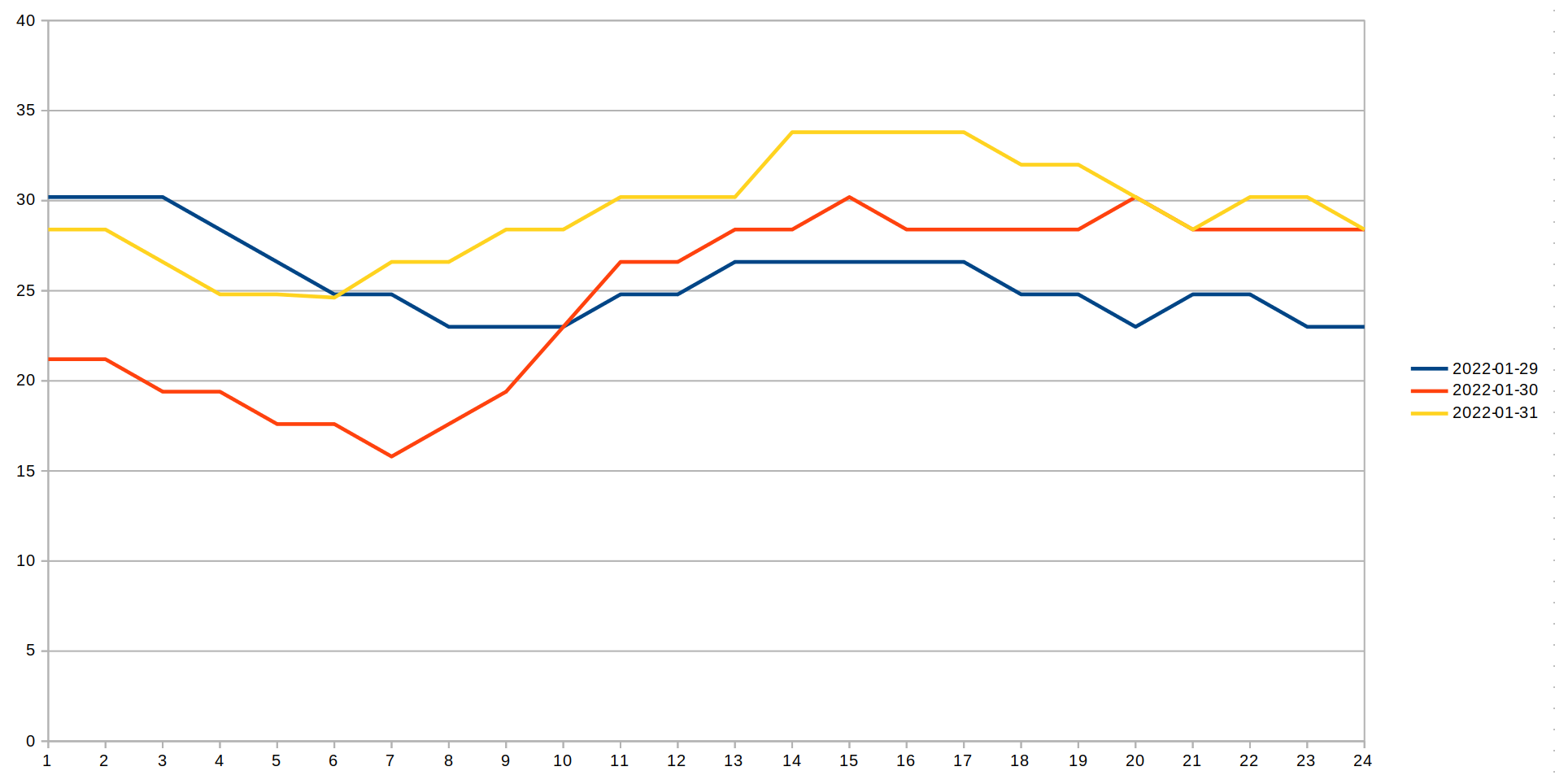
Check the trends!
Run your program on week1.tsv and plot the results. Then do the
same for week2.tsv and plot the results. See any trends? If
you run it on month.tsv you can plot the 24-hour temperature
curve for all the days in the month. It's interesting to look at!
~/bin/submit -c=SI204 -p=lab04 part1.cpp part2.cpp part3.cpp part4.cpp