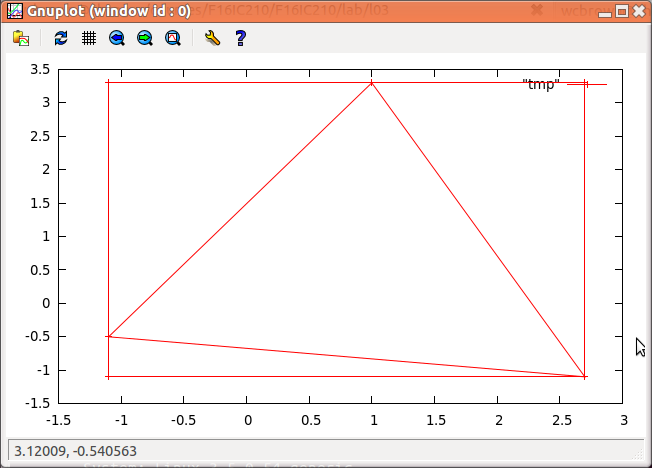
| sample run | explanation |
~/$ ./part3 (-1.1,-0.5) (1,3.3) (2.7,-1.1) -1.1 -1.1 -1.1 3.3 2.7 3.3 2.7 -1.1 -1.1 -1.1 -1.1 -0.5 1 3.3 2.7 -1.1 -1.1 -0.5 |
← drawing the bounding box ← drawing the triangle |
| checking your output in gnuplot |
|
part1.cpp) that converts between Dollars, Euros
and Pounds. The program reads input from the user in the
following format:
Convert amount currency_1 to currency_2
and prints results in the obvious way. Here are a couple of
sample runs:
~$ ./part1 Convert 3.50 Euros to Dollars ~$ ./part1 Convert 3.50 Euros to PoundsHere are the conversion rates you'll need:
~/bin/submit -c=IC210 -p=lab03 part1.cpp
part2.cpp)
to allow for Canadian
dollars as well.
~$ ./part2 Convert 3.50 Euros to Dollars Canadian ~$ ./part2 Convert 11.72 Dollars US to Dollars Canadian
~/bin/submit -c=IC210 -p=lab03 part1.cpp part2.cpp
part3.cpp) that reads in three points from the user and prints
output that the user can put in a file to give the program "gnuplot" to produce
a plot showing the triangle defined by the three user-input points along with
its bounding box, i.e. the smallest rectangle aligned with the coordinate axes
that contains the triangle.
Gnuplot is a standard tool for creating plots. Its input is simply a text file of points, one per line, given by the point's x-coordinate, followed by a space, followed by its y-coordinate. Gnuplot will draw a mark at each point, and connect successive points with segments, as long as they are not separated by blank lines. Note: this means that drawing a closed figure (like a triangle) requires repeating the first point at the end of the input.
First, let's install gnuplot on your laptop WSL, so you can work with it either on your laptop or in the lab(gnuplot is already installed on the lab machines):
sudo apt install gnuplot-x11
Here's a sample of running the program and using gnuplot to plot the results. Note: please print the lines defining the bounding box before the lines defining the input triangle. This is for automatic grading purposes, not because gnuplot cares.
|
|
~/bin/submit -c=IC210 -p=lab03 part1.cpp part2.cpp part3.cpp
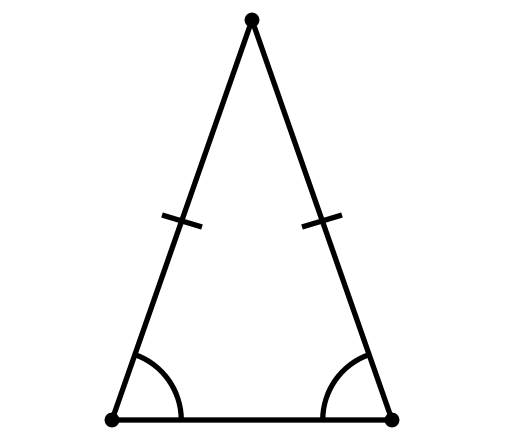
A corollary of the Pythagorean theorem's converse is a simple means of determining whether a triangle is right, obtuse, or acute, as follows. Let c be chosen to be the longest of the three sides and a + b > c (otherwise there is no triangle according to the triangle inequality). The following statements apply:
Example executions are shown below:
~/$ ./part4
Enter side lengths: 1 2 3
Error! these lengths violate the triangle inequality!
~/$ ./part4
Enter side lengths: 1.5 2 3
This is a obtuse scalene triangle.
~/$ ./part4
Enter side lengths: 2 2 3
This is a obtuse isosceles triangle.
~/$ ./part4
Enter side lengths: 2 2 2
This is a acute equilateral triangle.
~/$ ./part4
Enter side lengths: 2 2 1.5
This is a acute isosceles triangle.
Submission: If you're finished before lab ends, please demo for your instructor. Also submit via the class submit script as follows:
~/bin/submit -c=IC210 -p=lab03 part1.cpp part2.cpp part3.cpp part4.cpp