Course Logistics
Who is your instructor. Who is your section leader. Role of the website.
Course Policy and CS Department Honor Policy. Computing resources.
What is this course about?
This course is an introduction to programming. C++ is the language
we use, but this course is not only about learning C++.
It is about learning to program!
"How to program" is bigger than "C++" or any other language. Programming
is a creative process, in which you construct a model world inside the
computer that interacts with the real world via keyboards, mice, monitors,
speakers network connections, and so forth. It's very rewarding and
exciting; you will never be bored!
This course focuses on solid understanding of foundational
concepts, so please be patient with the fact that your programs
will usually be reading and writing text and not interacting with all the
fancy peripherals mentioned above.
Words of Advice
- Make friends with frustration.
Although it's exiting to write programs, it is frustrating at the same time.
- With probability 99.9%, your code won't work at one shot;
you need to debug your code, figuring out where you were wrong.
- Again unfortunately, with probability 99.9%, the debugging won't be
finished at one shot. After several trials (sometimes, tens or even
hundreds of trials, depending on the program size), your program will
finally work.
- Well, actually, you don't know for sure whether the program works
correctly. What you know is that the program works correctly on
several tested cases. There may be several tricky cases in which
your program will crash, or your program may be have some vulnerability
that may be exploited by hackers!
In summary, frustration will always be with you, so welcome it with your
open arms. Remember that you are learning something new, whenever you get
frustrated.
However, if you think you're too frustrated, you must seek
help. It's your responsibility to seek help. It's our responsibility
to help you with all our might when you seek help.
- Know that you will make a lot of mistakes.
As mentioned above, for each program, you will experience success only once;
the rest of more than 100 times, you will be wrong. There is nothing wrong to
be wrong when you write code; you just need to get it correct in the end.
What matters is whether can you learn from failures and fix them.
The structure of a simple C++ program
The example below shows the structure of a very simple C++ program. It's
annotated to describe the different parts of the program.
#include <iostream>


using namespace std;


int main()
{

  cout << "The answer is ";
  cout << 7*6;
  cout << endl;


  return 0;
}
|
← This "includes" code needed to use the "standard library" iostream.
  Libraries are repositories of compiled C++ code that we can use in
  our own programs. iostream provides input/output functionality.

← This allows us to use shorter names for standard library  objects.
  For example, without this line we have to  write "std::cout" rather
  than simply "cout".  The line is saying "just assume the 'std::'
  part".

← The "main" function.  For now, all our C++ code goes in between
  these { }'s.

← "cout << x" is how we write output.  The right-hand side can be
  almost any expression. "std::cout" is the full name of the output
  stream associated with the terminal.  "cout << endl" sends a
  newline to the output stream.

← A program actually returns a number to the command shell that
  launched it.  Returning 0 is like saying "this program exited
  normally".
|
Some more comments follow:
Compiled vs interpreted, and why C++ is different than Javascript
In SY110, all of you got exposed to Javascript programs. You'll notice that what
we do here feels a lot more low-level, and requires a lot more discipline.
-
Javascript is an interpreted language.
This means that the code you
write is read and processed by the browser, which then executes the steps
demanded by that code.
-
C++ is a compiled language.
As shown in the figure below, this
means that the code you write is read and processed by a special-purpose
program called a compiler, which translates it into the zeros and
ones that the CPU speaks, and stores it in an executable file. At some
later point, the OS is told to start the program stored in the executable
file running, and the CPU initiates its fetch-decode-execute cycle on the
code contained in that file.
 |
Step 1: Planning.
Think about what your program should do and plan how you are going to write it. For many simple programs this part will be pretty obvious, but when you start to write bigger programs, it might be the most important step!
|
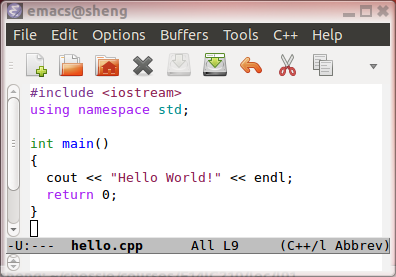 |
Step 2: Source code writing.
Use an editor to create the file hello.cpp containing
the source code for the program.
|
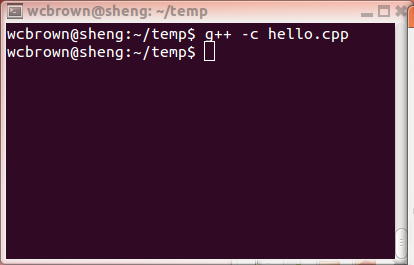 |
Step 3: Compilation.
Use a compiler (g++ in this case) to translate the human-readable
C++ source code into machine-readable object code
hello.o.
|
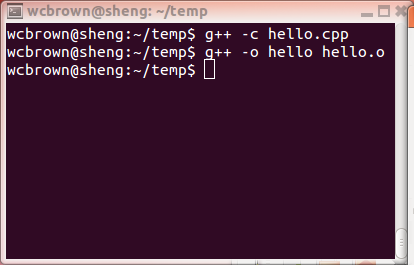 |
Step 4: Linking.
Use a linker (g++ does this as well) to combine our object file
hello.o with other object files (like those that take care of
input/output) to create the executable program hello.
|
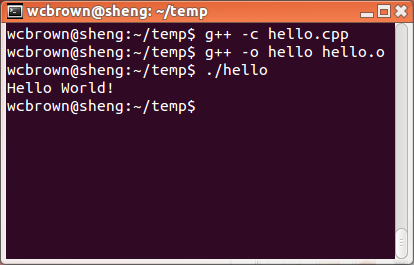 |
Step 5: Execution.
Use the OS to initiate execution of (i.e. start the fetch-decode-execute
cycle on) the program hello.
|
All these steps are kind of a pain in the neck, but remember: we're
writing a program that is executing on "bare metal", i.e. directly on the
CPU.
Practice Problems
At the end of the notes for almost every lecture will be a couple of
example problems with solutions. Everyone likes to see examples of code,
so that's what we give you!
Do you know ...
The section will ask you if you understand important points of the lecture.
- How are Javascript and C++ different?
- What are five steps you need to go through, when you write a program
with the C++ programming language?
