int* p;                 // declare a pointer p
p = new int[10];        // p points to a newly allocated array of 10 ints

Up till now, a program couldn't store -- couldn't remember -- anything except in variables. This meant that the program couldn't remember more data than the number of variables than the programmer put into the program. Essentially the program can't remember more data than the programmer typed in while creating the program.
Arrays shatter that limitation: An array is a single variable with which a program can store and retrieve a nearly limitless amount of data.
char and int, we need a different
way of using arrays.
For example, you can create and use an array of 10 ints as follows:
int objects in memory.
ints by index.
new operatorp as a pointer to objects of type
int, we have to actually allocate some ints
in memory for it to point to! Just declaring p leaves it
uninitialized - i.e. pointing to nothing, or what's worse, pointing to some
random area of memory.
For example, to allocate 10 ints in memory and set p
to point to the first of them, we'd write:
|
|
new operator using the following sytax:
new type[number]
This expression allocates number consecutive objects of type type in memory, and returns a pointer to the first object.
|
|
At this point, we can access any of these int objects by the
indices 0,1,2,3,4,5,6,7,8,9.
For example:
int in the
array, we write p[0].
int in the array, we write p[1].
int in the array, we write p[2].
int in the array, we write p[9].
In summary:
new operator are what we
use for arrays. In particular, an array is really a contiguous block of
objects in memory, and the pointer variable allows us to access the objects
in this block by index.
The following picture depicts what's going on when we create an array of 4
ints and assign a value to one of the ints in the
array.
| DECLARE VARIABLES | 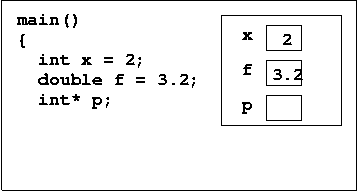
|
Notes on scope: The pointer is a variable with name and
scope like we're used to. That is, the pointer |
| ALLOCATE SPACE | 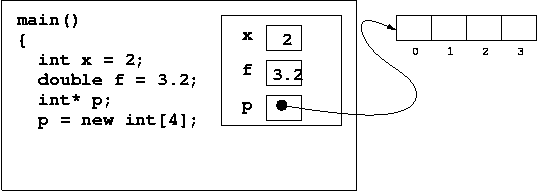
| Notes on scope:
However, the array that pointer points to is in a different area of the program's memory called, the heap. The array itself is not part of any function call record on the stack. That's what this picture is showing you. |
| ASSIGN A VALUE | 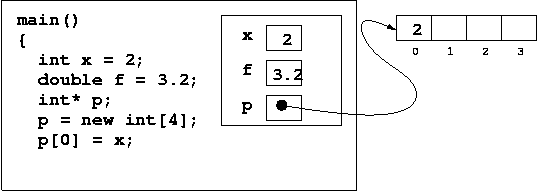
|
|
p[i] is equivalent to *(p+i)
|
doubles from the user
Note that since we can access each element of an array by index, we could access them in any order, including in reverse order.
int main()
{
  // Get number of doubles from user
  int n;
  cout << "How many doubles? ";
  cin >> n;

  // Construct array
  double* A;
  A = new double[n];

  // Read numbers
  cout << "Enter " << n << " doubles: ";
  for(int i = 0; i < n; i++)
    cin >> A[i];

  // Write in reverse order
  cout << "In reverse your numbers are: ";
  for(int j = n - 1; j >= 0; j--)
    cout << A[j] << " ";
  cout << endl;

  return 0;
}
If you keep this in mind, some things that might otherwise trip you up make perfect sense. For example:
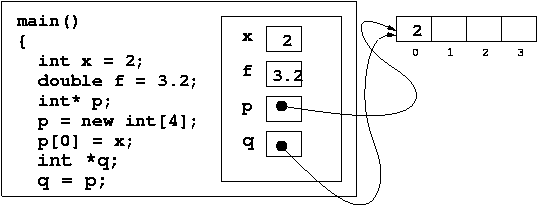
What's hopefully clear here is that by creating a new pointer q
and setting q = p, we did not
create a new array populated with the same integer values. We just created a
new pointer and set it to point to the same old array.
int* pa = new int[3];
int* pb = new int[3];
pa[0] = 1;  pa[1] = 2;  pa[2] = 3;
pb[0] = 6; pb[1] = 7; pb[2] = 8;

int* q;
q = pb;
q[1]++;
cout << pa[1] << " " << pb[1] << " " << q[1] << endl;

q = pa;
q[1]++;
cout << pa[1] << " " << pb[1] << " " << q[1] << endl;
2 8 8
3 8 3
new have no scope
and live until you kill themnew is
that they have no scope.
So, for example, if you wrote a function that called new to
allocate some space, the objects in memory created by new would
not be destroyed when the function returned, even though the pointer we
had goes out of scope.
Take this example:
| Before the function call | 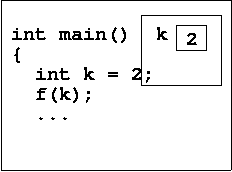 |
| During the function call | 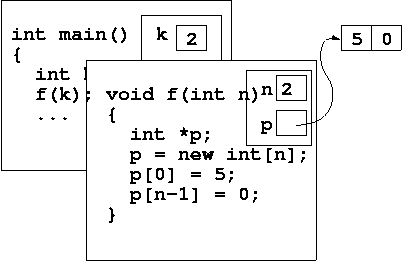 |
| After the function call | 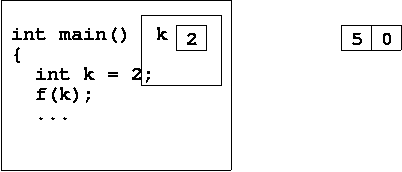 |
delete []new either stick around until the end of the
program, or are explicitly destroyed with the delete operator.
For example:
char* p;
p = new char[30]; 	// creates 30 consecutive char's in memory
delete [] p;        // destroys the objects created by new
delete later.
bool* B = new bool[10];
B is bool*, and the type of
B[0] is bool.
If we have the declaration
string* A = new string[20];
A is string*, and the type of
A[0] is string.
A[5] is an lvalue, i.e. it is allowed on
the left-hand side of an assignment. This is tremendously important.
This means that A[5] is not a copy of the index-5 element of the
array, it is the actual index-5 element. You can modify it.
For example:
string* A = new string[20];
A[5] = "hello";
int* C = new int[10];    // C has type int*
cin >> C[2];             // read an integer from the user to C[2]
C[2]++;                  // increment C[2]
You might wonder how an expression C[2]++ should be
evaluated. If you look at the operator precedence table (under
resources) you'll see that [.] has very high precedence, so
C[2]++ evaluates as (C[2])++.
Consider the following code:
|
Give the type of each expression below (drag your mouse to check answers):
|
| wrong | right | recommended |
|
|
|
p to be of type int* and q to be of type
int. So the int applies to all the variables, but the
* part only applies to the next variable.
If you wanted both p and q to be "pointers to ints",
you'd have to write
int *p, *q; // now you are declaring two pointers!!
This is unfortunate; it's just because the syntax of C++ is inherited from that of C. For this reason, when it comes to pointers, we recommend that you always declare a single pointer variable.
Enter dimension: 4
Enter two vectors:
[3,-1,0,2]
[5,0,9,-7]
Dot product = 1
Try it for yourself and then take a look at a solution.
doubles?
p and q. When
q=p; is executed, will the whole array be copied?
Answer: No
int* p = new int[n];