IT360 Lab 12 Database Security
DUE: April 14, 2014, before
2359 (paper copy due BEFORE start of lab next day)
This lab is a collection of
database security concepts. You will see
how to give others access to your data, ensure that passwords are encrypted,
and use session variables for secure access to your web site. Open a document and call it yourlastname_yourfirstname_Lab12.txt. You
will place all your answers to the lab questions in this document.
Preliminaries:
- Create a
Lab12 directory on your W drive. Download the lab12.zip file from the course calendar (Lab12) and unzip it
in your Lab12 directory.
- Open MySQL
Workbench and run the lab12tables.sql script to create the following two
table into your database: users12(UserID, Password, Type) and
songs12(SongID, Artist, Title, Votes).
- Modify the
default argument values in the myConnectDB.ini.php from the unzipped file
to match your credentials, or copy your myConnectDB.ini.php from a
previous lab into your Lab12
directory
Part 1
Database Security: Granting Privileges
As a database user, you currently have a username (mxxxxxx), password, and you have the rights (permissions) to a particular database (mxxxxxx) where you can create tables, insert into them, etc. Assume now that you are a database administrator, and you are the one giving permissions to users to use the database. For security reasons, you should restrict access to your database as much as possible, and only give permissions that are really needed in order to accomplish the task. We'll accomplish this through the use of the SQL GRANT statement.
GRANT <permissions>
[ON <table(s)>]
TO <user>
For example, GRANT INSERT ON mydatabase.AppUsers to mxxxxxx, will allow the user mxxxxxx to insert data into the AppUsers table in the database called mydatabase.
Now, let's take a closer look at the GRANT statement line-by-line. The first line, GRANT <permissions>, allows us to specify the specific permissions we are granting. These can be either table-level permissions (such as SELECT, INSERT, UPDATE and DELETE) or database permissions (such as CREATE TABLE, DROP TABLE, ALTER DATABASE, GRANT, etc). More than one permissions can be granted in a single GRANT statement, but table-level permissions and database-level permissions may not be combined in a single statement.
The second line, ON <table>, is used to specify the affected table for
table-level permissions. Use the format databaseName.tableName(s).
This line is omitted if we are granting database-level permissions.
The third line specifies the user that is being granted permissions.
For this part of the lab, you will need a partner. Please work with a colleague
to accomplish and test the tasks below. Write all answers to
yourlastname_yourfirstname_Lab12.txt
1. Connect to cardhu using MySQL Workbench and then try to select all songs from your partner’s songs12 table: SELECT * FROM myyyyyy.songs12; where yyyyyy is your partner’s alpha. What is the answer?
2. Ask your partner to grant you select privileges to his songs table. You should also write a GRANT statement to grant SELECT privileges on your songs table to your partner (use the GRANT syntax given above). Write your statement in yourlastname_yourfirstname_Lab12.txt
3. Try again the SELECT * FROM myyyyyy.songs12; where yyyyyy is your partner’s alpha. What is the answer this time? If you get the same answer as before, make sure your partner executed the Grant statement and try to logout and log back in to MySQL Workbench.
4. What happens if you try to INSERT a new song into your partner’s database by using the following statement: INSERT INTO myyyyyy.songs12(Title, Artist) VALUES('Your Favorite Song', 'Your Favorite Artist')? Why?
5. Now that you saw how you can grant privileges using the GRANT command, revoke the privileges that you granted to your partner: REVOKE SELECT ON mxxxxxx.songs FROM myyyyyy; where yyyyyy is your partner's alpha.
Part 2 Application Security: Protecting Passwords
I have provided a
basic userPage.php and user.inc.php in the zip file downloaded from the course
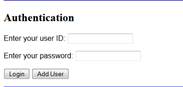
calendar. The userPage.php is a basic login page. We will add to that
functionality next.
SHA Hashing:
- Modify userPage.php downloaded from
the course calendar to add and process an “add user” button. When clicked,
the “addUser” function in user.inc.php should be invoked with the appropriate parameters (similar with
the add product in Lab 10).
Test your add user button by inserting
a few users. Check that users were indeed inserted by using the MySQL
Workbench, SELECT * FROM users12;
- Add a line in addUser function in
user.inc.php to hash the password received and insert the hashed password into the database, instead of the
plain text password. To hash a password, you can use the PHP sha1
function. For example,
$hashed =
sha1("some string here");
returns the hashed version of the "some string here".
Insert
a new user by invoking userPage.php from a browser and check your MySQL
database and see that the passwords are now hashed.
8.
Now modify the
“validate” function in user.inc.php to check against this new sha1
value.
9.
How does the
hashing change the response to a user’s question: I forgot my password, can you
tell me what it is? What should be the answer if hashing is used? Write your
answer in yourlastname_yourfirstname_Lab12.txt
Part 3 Application Security: Session Variables
Remember the song website we started to create in class. With the new userPage.php
in place, I would like to only allow valid users to access the songPage.php.
The code currently in the userPage.php sets a session variable for the valid
users and redirects them to songPage.php, so everything seems fine if users
invoke userPage.php first. Only valid users should be able to see the list of
songs, but try to access the songPage.php without logging in (without
going to userPage.php first).
- What
happened? Why? Although you may not think that this is
a big deal, what if it was a list of your accounts and account numbers
instead of a bunch of songs?
- Modify the
file songPage.php to ensure that only valid users (ie. those who
have logged in properly and have had the $_SESSION['name'] session
variable set) will be able to see the page content.
Part 4 Application Security: SQL Injections
- a) Write a
simple SQL Injection attack for any of the pages used for this lab.
Anything that would change in any way the intended functionality of any of
the pages is OK (ex. Get to display error messages that reveal the
database schema, or display more information than intended). Write in
yourlastname_yourfirstname_Lab12.txt the string you used in your attack,
and the page and field you tried it on.
b) What are the effects of your
attack?
- How should the
code be modified for the page that was attacked in order to prevent future
attacks of the same type? (you do not have to actually modify the code,
just say what needs to be done).
Extra credit: Real SQL
Injections
- Search the web
and give an example of a real world attack that used SQL injection.
Provide a link to the article mentioning such attack.
Extra credit: Secure Sockets Layer: Many people use online banking. Go to the homepage for Navy Federal Credit Union at http://www.navyfcu.org. Note that the text boxes on the left are similar to the login screen that you used in this lab (userPage.php). Use any resource you would like and research how the server and client communicate during the session set up process for SSL/TLS (Chapter 18 in the “PHP and MySQL Web Development” book, your networks class, or discussion on SSL/TLS from IT350 might help).
- Consider your knowledge of networking and Internet programming and describe all the steps that happen when you enter your login information in these text boxes and press the “Sign on” key.
- What would be the address in the browser’s address bar to invoke your userPage.php using a secure connection (SSL/TLS)?
Finally: Make sure you
incorporate these “best practices” into your project. This means adding the appropriate test cases
for SQL injects, checking session variables before page displays and saving all
passwords as hashed values. We will not
be using TLS for this course, but in the real world, you would also make sure
to use TLS for appropriate secure transactions (ie, logins and passing of
account information).
Turn in (BOTH
electronic and paper submissions are required):
Electronic (due
before 2359 on April 14, 2014):
- Upload
yourlastname_yourfirstname_Lab12.txt
with all your answers, and your version of the files userPage.php, user.inc.php,
and songPage.php to the Lab 12 assignment on the Blackboard.
Hard-copies (due
before start of lab on April 15, 2014):
- The completed assignment coversheet. Your comments will help us improve the course.
- A hard copy of your yourlastname_yourfirstname_Lab12.txt containing the answers for each exercise, and hard copies for your modifications in userPage.php, user.inc.php, and songPage.php