Topics to cover
- Variable declaration
- Assignment: storing a value into a variable.
- Legal variable names.
- Using
cin and cout.
-
double data type.
-
#include <cmath> and sqrt() function.
Variable as storage
Suppose I want to compute something like \((3.55 - 17.017)^3\). I can do this
with C++, but because C++ doesn't have an operator for exponentiation, I need
to write:
cout << (3.55 - 17.017)*(3.55 - 17.017)*(3.55 - 17.017) << endl;
This is a bit of a hassle. Normally we would think of first computing
(3.55 - 17.017), then taking the resulting value and cubing it. Hopefully
we think something like:
Let x be (3.55 - 17.017) and compute x*x*x.
We need a variable x in which to store the value (3.55 - 17.017)!
So we try creating the following program:
How do you create a variable?
Answer: Variable declaration.
A wrong attempt
#include <iostream>
using namespace std;

int main()
{
  x = 3.55 - 17.017;        // The = operator assigns a value to the variable x.

  cout <<  x*x*x << endl;
  return 0;
}
When we compile this, we get an error message like
error line 4: 'x' is an undeclared identifier
What the compiler is saying is this:
Complier: x??? you never told me there was going to be an x!
If you want to use x to store the value (3.55 - 17.017), you need to first
tell the compiler that the name x is going to stand for a number -
this is called declaring the variable
x.
The right way: type name;
Look at the following statement:
double x;
- The statement declares that x is a variable of type double.
- Note the syntax:
- Type (i.e.,
double)
- Variable name (i.e.,
x)
- Semi-colon
- Type
double: The double type stands for real
numbers (i.e., numbers with a decimal point).
The type of a variable tells you what kind of data objects can be stored in the
variable. There are many different types in C++. For example, the following
statement declares an integer variable y:
int y;
That is, type int stands for integers. As you will see,
understanding types is one of the most important skills you'll learn in this
course.
How to store a value in a variable?
Answer: Assignment.
The = operator assigns a
value to the variable x. That is, the value -13.457 (i.e., 3.55 - 17.017) will
be stored in x.
To make the program work, we write:
#include <iostream>
using namespace std;

int main()
{
  double x;                 //declare x as a variable to store doubles
  x = 3.55 - 17.017;        // **** assign x the value 3.55 - 17.017 ****
  cout <<  x*x*x << endl;   //print out x^3
  return 0;
}
Once x has been declared as a variable of type double, it can be
used in the program just like a normal number, either to print
or to use in arithmetic expressions, like
cout << x*x*x << endl, which does both.
What really goes on here is as follows:
- Space in your computer's memory
is allocated for one object of type
double, and
given the name x.
- When you ask for the value of x (by involving
it in an arithmetic expression or by trying to print it) the
computer fetches a copy of the value from memory.
- When you
use the = operator, the computer takes the value on the right
hand side, and copies it into the storage reserved for x.
Thus, strange sequences like:
double x;
x = 3.5;
x = 2.4;
... make perfect sense.

|
- After the statement
double x;, storage is reserved for x,
though we have no idea what actual value is in there - at this point,
x is uninitialized.
- The statement
x = 3.5; copies the value 3.5 into the storage
reserved for x.
- Finally, the statement
x = 2.4; copies the value 2.4 into the
storage reserved for x, thus overwriting the 3.5 that had been there
previously. Think of x as being the name of a box into which
double values can be written (see the figure on the right).
|
Legal Variable Names
Are you allowed to use any word or letter you want in order to represent a
legal variable name? The answer is NO.
In some programming languages variables have to begin with funny
characters. Such a character is usually referred to as a "sigil". In
bash scripting variables begin with a "$", which is a common sigil. Perl
has many sigils, including $, @ and %. For better or for worse, C++
doesn't do that to us.
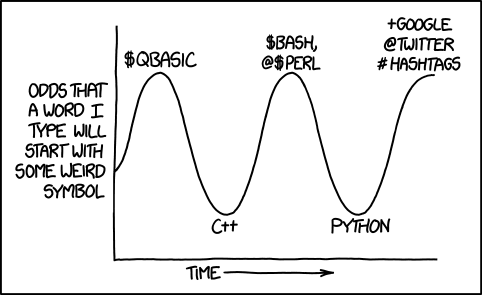
http://xkcd.com/1306/
-
A variable name must begin with a letter
(lowercase or uppercase) or an underscore (i.e., _ ).
-
It may be any length you want (although anything after the first 32
characters will be ignored) but it can only contain letters, digits, and
the underscore.
Except in special situations, the use of the underscore to begin a
variable name should be avoided.
C++ keywords can't be variable names
There are a special class of names called keywords, which are
reserved for use by C++, and you may not use one of them to name a
variable.
Examples of keywords are:
double, int, return
(A complete list can be found on this page.)
It's not a good idea to use cin for a variable name
There are also non-keyword names that you are allowed but strongly discouraged
to choose for variables, since they are already used for important things.
Examples include main, cin and cout. If
you use these names, they will confuse you. For example, what would happen
with the following:
double cin;
cin >> cin;   // both cins will refer to the above double variable
As it turns out, the compiler will assume that both cin's
refer to your new double and you won't be able to use
cin for reading. As we proceed, it will become
obvious what cannot be used as variable names.
Reading user input from the terminal -- cin
We've already seen how to output information from a program using
cout. In C++ (and in many other places) we refer to an
output stream, the idea being that each thing we write goes out
sequentially in the order we write it. In exactly the same way, we read
from an input stream.
cin is really called std::cin, but if we use using
namespace std; we may drop the std:: part. (We
usually put the line using namespace std; after the
#include's.) It's defined in the iostream library,
just like cout.
Not surprisingly (given that our output stream is cout) our
input stream object is called cin.
| Code |
double x, y;
cin >> x >> y; |
| User Types |
12.0  25.0
25.0 |
| Effect |
x gets the value 12.0, y gets the value 25.0. |
Note: Be
careful about the direction!
cin >> x; // use >> for cin (i.e., from the standard input to x)
cout << x; // use << for cout (i.e., to the sandard output from x)
cin skips spaces (i.e., blanks, or tabs, or newlines)
When reading into double x, cin skips any
spaces, tab's, or newlines until it comes across a number. So, for example:
| Code |
double x, y, z;
cin >> x >> y >> z; |
| User Types |
12.0  25.0
7.1 25.0
7.1 |
| Effect |
x gets the value 12.0, y gets the value
25.0, and z gets the value 7.1 |
In the above example, cin skipped three spaces (i.e., and
).
Sample code: Addition calculator
Putting this together, we can construct a very simple program Addition
Calculator, which reads in two numbers from the user and adds them
together.
#include <iostream>
using
    namespace std;
int main()
{
// Read first number
double x;
cout << "Enter first number : ";
cin >> x;
// Read second number
double y;
cout << "Enter second number: ";
cin >> y;
// Calculate sum
double sum;
sum = x + y;
// Print sum
cout << "The sum is: " << sum << endl;
return 0;
}
|
Notes on naming variables
- Give a good name.
Note the variable
sum in the program Addition Calculator.
The variable contains the sum of the two numbers input by the user is actually
called sum. This enhances the readability of my code. I
could've called the variable "George", but it is much better to call it "sum".
It is really important to give a good name (containing the meaning and
intention) to a variable.
- Don't overuse the fact that C++ is case-sensitive.
C++ distinguishes between uppercase and lowercase. As a result,
Answer and answer will be considered different
variable names. A very common mistake that beginning programmers make is
to be sloppy in writing variable names, sometimes using capitals and
sometimes not. It is not good programming practice to use two variable
names that are spelled the same except for capitalization because it leads
to errors.
-
Try your best to write source code that is easy enough for mere mortals to
understand (interpret this to mean the instructor grading your programs). Use
meaningful variables names.
|
What can we do with doubles?
Very few of the mathematical operations we typically use with real numbers
are part of the core C++ language. In fact, the only operations you'd
recognize from math class are +, -, *, and /. Operations like
exponentiation, square roots, logs, and so on are not part of the core
language, but they are available to you in libraries.
Libraries extend the functionality of C++. There is a set of standard
libraries that are an official part of the language (Here is some online
documentation on the standard libraries.), and the
iostream library we've been using is one example.
Mandatory Practice Problems
Write a program that reads in the coeeficients of
a quadratic polynomial, and prints out its roots.
Sample run:
$ ./a.out
Enter coefficient a of a x^2 + b x + c: 1
Enter coefficient b of a x^2 + b x + c: 5
Enter coefficient c of a x^2 + b x + c: 6
The roots of the polynomial are -3 and -2.
The quadratic formula says that the roots of a
polynomial a x^2 + b x + c are:
           ____________           ____________
    -b - \/ b^2 - 4 a c    -b + \/ b^2 - 4 a c
x = ------------------- ,  -------------------
            2 a                    2 a
Basic C++ does not have a "square root" function
so you have to use one of the "Standard Libraries"
to get it. We've been using one such library,
"iostream", for i/o. For mathematical functions
we use "cmath". So "include" cmath, and you can
use the "sqrt" function, which takes an object of
type double and returns an object of type double,
namely the squareroot of what you gave it.
Solution: Roots of Quadratic Polynomials
Other Practice Problems
Fahrenheit - Celsius Conversion
Computing Slopes
Compound Interest Calculation. There are two solutions given for this
problem, Version 1, and Version 2. Version 2 uses variable reassignment for
the first time.