Honor
The
course policy and the
instructions it references, most pertinently
COMPSCIDEPTINST
1531.1D, spell out what kinds of assistance are permissible for
programming projects.
What you can do
- You may get help from your instructor.
- You may use general purpose resources online; such use must be
documented.
What you cannot do
-
You may not discuss the project with any other student.
-
You may not look at any other student's project code.
-
You may not show your own code to others.
-
You may not copy code and submit it as your own work.
-
You may not look at online resources that are directly related to the
solutions to the project.
If you have questions about any of these rules, email your instructor and ask
about it.
Overview of the Project
In this project, we will study different aspects of three modes of operations:
ECB, CBC, CTR modes.
- You will know how to use them in Python.
- You will understand the padding scheme.
- You will study security/insecurity of these modes.
Dealine, Penalty and Reward (Read Carefully)
- You have to submit your work on Parts 1 and 2 by 2359 on 3/27. Otherwise,
you will get a 5% penalty.
- If you can submit your entire work by 2359 on 3/31, you will get a 5% reward for
your early submission.
- The normal deadline is 2359 on 4/2.
- The late submission deadline is 2359 on 4/3. You will get a 5% penalty if
your submission is late.
[20pts] Part 1: Implementing the ECB Mode
Cryptodome package
We will use Cryptodome package, which can be installed as follows (the lab
machines already have the package installed):
pip3 install pycryptodomex --user
Your Task
Write project.py that contains the following functions that
implement the ECB mode operations: For your convenience, I am giving you the
template.
# project.py
# name: ...
from Cryptodome.Cipher import AES
from Cryptodome.Util.Padding import pad
from Cryptodome.Util.Padding import unpad

# read in_plain_file, encrypt the data, and store the ciphertext in out_cipher_file
def encrypt_ecb(in_plain_file, out_cipher_file, key):
  # do something

# read in_cipher_file, decrypt the ciphertext, and store the plaintext in out_plain_file
def decrypt_ecb(in_cipher_file, out_plain_file, key):
  # do something

# read normal_bmp_file and in_cipher_file, fix the header in the ciphertext and
# store the results in out_cipher_bmp_file
def fix_bmp_header(normal_bmp_file, in_cipher_file, out_cipher_bmp_file):
  # do something
Requirement
- You must use Cryptodome package, which can be installed as follows (the lab
machines already have the package installed):
pip3 install pycryptodomex --user
- Documentation: Crypto.Cipher package,
AES and Classic modes of operation.
Note that documentation uses "Crypto.Cipher". However, in this project, you
need to use "Cryptodome.Cipher". For the sake of backward compatability, the
same package is provided under two different names:
- pycryptodome
- pycryptodomex
We are using the second, and for this reason, we need to use "Cryptodome"
instead of "Crypto".
- Be careful about padding. See the documentation for how to use
the functions
pad() and unpad().
- The function
fix_bmp_header, as shown in the lecture
notes, should copy the bmp header in the normal_bmp_file
into out_cipher_bmp_file.
- The variables
..._file should have string type containing
a file name.
- The variables
key should have
bytes type.
- The plaintexts and ciphertexts should be of bytes or
bytearray type.
Test code
#!/usr/bin/python3
# test_part1.py

from project import *

key = bytes.fromhex("00112233445566778899aabbccddeeff")
encrypt_ecb("pic_original.bmp", "prj_ecb.bin", key)
decrypt_ecb("prj_ecb.bin", "prj_dec.bmp", key)
fix_bmp_header("pic_original.bmp", "prj_ecb.bin", "prj_ecb.bmp")
Sample Run
$ ./test_part1.py
$ md5sum pic_original.bmp
b62c61f912f1cb7037762d5fddcf782b  pic_original.bmp
$ md5sum prj_ecb.bin
36b89a0993197a0447a08e2c8722c675  prj_ecb.bin
$ md5sum prj_dec.bmp
b62c61f912f1cb7037762d5fddcf782b  prj_dec.bmp
$ md5sum prj_ecb.bmp
3a8b8dec89ef06b882d06565773ab3e3  prj_ecb.bmp
$ eog prj_ecb.bmp &
[20pts] Part 2: CBC and CTR mode
Implement the functions appropriately so that the following test code works
correctly. Download pic_original.bmp from the lecture on Modes of
Operation.
#!/usr/bin/python3
# test_part2.py

import project

key = bytes.fromhex("00112233445566778899aabbccddeeff")
iv = bytes.fromhex("000102030405060708090a0b0c0d0e0f")

project.encrypt_cbc("pic_original.bmp", "prj_cbc.bin", key, iv)
project.decrypt_cbc("prj_cbc.bin", "prj_cbc_dec.bmp", key, iv)

ctr = iv
project.encrypt_ctr("pic_original.bmp", "prj_ctr.bin", key, ctr)
project.decrypt_ctr("prj_ctr.bin", "prj_ctr_dec.bmp", key, ctr)
Tips
- Documentation: Crypto.Cipher package,
AES and Classic modes of operation.
- Depending on which mode you're working on, you may (or may not) need to
use padding. Read the class notes on this topic.
- Strangely, for the CTR mode, the Cryptodome package requires the 16-byte
ctr to be specified with two 8-byte objects: nonce and
initial_value.
- Specifically, in your function implementation of
project.encrypt_ctr, split the input parameterctr into
nonce and initial_value, and then feed them
when creating a Cipher object.
- Don't use
counter but initial_value
when creating a Cipher object (read the documentation
carefully and understand the difference between the two).
- Since some input parameters are unused (e.g.,
counter), you have to explicitly specify the
parameter names (e.g., using nonce = ) when you feed the
arguments.
- Use
eog to see if the decrypted bmp is the same as the original.
Sample runs
After running the code correctly, you should have the following results:
$ ./test_part2.py
$ md5sum prj_cbc.bin
ef302657d9d8c602ce87d8b979ef72d1  prj_cbc.bin
$ md5sum prj_cbc_dec.bmp
b62c61f912f1cb7037762d5fddcf782b  prj_cbc_dec.bmp

$ md5sum prj_ctr.bin
7901dcdfc7c7b8ef37a8359d8206d477  prj_ctr.bin
$ md5sum prj_ctr_dec.bmp
b62c61f912f1cb7037762d5fddcf782b  prj_ctr_dec.bmp
[20pts] Part 3: Padding
For block ciphers, when the size of a plaintext is not a multiple of the block
size, padding may be required. The PKCS#5 padding scheme is widely used. Let's
see how the padding algorithm works:
>>> from Cryptodome.Util.Padding import pad

>>> blk_size = 16

>>> pad(b"0123456789", blk_size)
b'0123456789\x06\x06\x06\x06\x06\x06'

>>> pad(b"0123456789a", blk_size)
b'0123456789a\x05\x05\x05\x05\x05'

>>> pad(b"0123456789ab", blk_size)
b'0123456789ab\x04\x04\x04\x04'

>>> pad(b"0123456789abc", blk_size)
b'0123456789abc\x03\x03\x03'

>>> pad(b"0123456789abcd", blk_size)
b'0123456789abcd\x02\x02'

>>> pad(b"0123456789abcde", blk_size)
b'0123456789abcde\x01'

>>> pad(b"0123456789abcdef", blk_size)
b'0123456789abcdef\x10\x10\x10\x10\x10\x10\x10\x10\x10\x10\x10\x10\x10\x10\x10\x10'

>>> pad(b"0123456789abcdefxxxx", blk_size)
b'0123456789abcdefxxxx\x0c\x0c\x0c\x0c\x0c\x0c\x0c\x0c\x0c\x0c\x0c\x0c'
As you see from the above sample runs, the padding algorithm works as follows
(read carefully):
- Note that the padding algorithm adds pad so that the final data length is
a multiple of 16 (i.e., the AES block size).
- For example, suppose that the original data is b"0123456789".
- The data is 10 bytes long.
- You need to 6 more bytes, so that the final length may be 16.
- Padding: add 6 bytes, and in each byte, its value is again 6.
- Consider b"0123456789abcdef".
- The data is 16 bytes long.
- You must always give a padding. So, you need 16 more bytes, so
that the final length may be 32.
- Padding: add 16 bytes, and in each byte, its value is again 16 (i.e.,
b"\x10").
- Consider b"0123456789abcdefxxxx".
- The data is 20 bytes long.
- So, you need 12 more bytes, so that the final length may be 32.
- Padding: add 12 bytes, and in each byte, its value is again 12 (i.e.,
b"\x0c").
Your Task
Write your own padding/unpadding
functions (i.e., functions pad2 and unpad2) that
implement PKCS#5. Of course, you should use bytes or
bytearray directly instead of calling use the pad/unpad function
in Cryptodome.
Carefully look at the following sample runs. In particular, your
unpad2 function should output "padding error!" if the padded data
has an incorrect format.
>>> import project
>>> padded = project.pad2(b"0123456789")
>>> padded
b'0123456789\x06\x06\x06\x06\x06\x06'

>>> padded = project.pad2(b"0123456789abcdef")
>>> padded
b'0123456789abcdef\x10\x10\x10\x10\x10\x10\x10\x10\x10\x10\x10\x10\x10\x10\x10\x10'
>>> project.unpad2(padded)
b'0123456789abcdef'

>>> data = bytes([i for i in range(37)])
>>> data
b'\x00\x01\x02\x03\x04\x05\x06\x07\x08\t\n\x0b\x0c\r\x0e\x0f\x10\x11\x12\x13\x14\x15\x16\x17\x18\x19\x1a\x1b\x1c\x1d\x1e\x1f !"#$'

>>> unpadded = project.unpad2(data)               # the length of data is not a multiple of 16
padding error!
>>> print(unpadded)
None

>>> padded = project.pad2(data)
>>> padded
b'\x00\x01\x02\x03\x04\x05\x06\x07\x08\t\n\x0b\x0c\r\x0e\x0f\x10\x11\x12\x13\x14\x15\x16\x17\x18\x19\x1a\x1b\x1c\x1d\x1e\x1f !"#$
\x0b\x0b\x0b\x0b\x0b\x0b\x0b\x0b\x0b\x0b\x0b'
>>> len(padded)
48
>>> unpadded = project.unpad2(padded)
>>> print(unpadded)
b'\x00\x01\x02\x03\x04\x05\x06\x07\x08\t\n\x0b\x0c\r\x0e\x0f\x10\x11\x12\x13\x14\x15\x16\x17\x18\x19\x1a\x1b\x1c\x1d\x1e\x1f !"#$'

>>> padded2 = bytearray(padded)
>>> padded2[46] = 1                 # corruptting the padding
>>> padded2 = bytes(padded2)        # padded2 now contains an incorrect padding
b'\x00\x01\x02\x03\x04\x05\x06\x07\x08\t\n\x0b\x0c\r\x0e\x0f\x10\x11\x12\x13\x14\x15\x16\x17\x18\x19\x1a\x1b\x1c\x1d\x1e\x1f !"#$
\x0b\x0b\x0b\x0b\x0b\x0b\x0b\x0b\x0b\x01\x0b'
>>> unpadded = project.unpad2(padded2)
padding error!
>>> print(unpadded)
None
[10pts] Part 4: Known Plaintext Attack on the CTR mode -- When CTR is reused
Encryption modes usually require an initial vector (IV) or counter (CTR). If
we are not careful in selecting them, the encrypted data may not be secure at
all, even though we are using a secure encryption algorithm and mode.
One may argue that if the plaintext does not repeat unlike
pic_original.bmp, it may be secure to the same IV (or CTR). Unfortunately,
we show that that is not the case.
Let us look at the CTR mode. Assume that the attacker gets hold of a plaintext
(P) and a ciphertext (C), can he/she decrypt other encrypted messages if the
CTR is always the same?
Your Task
You are given the following information,
P: 546869732069732061206b6e6f776e206d65737361676521
C: ed6b6ee550650f5b9bb699678e244260c3bc87ec8a3172d7
target: d26d68e11e2c0c179bff9c7d842b5860cfad9fbfa80245fc
|
To do:
What is the underlying message for the ciphertext target
(i.e., the contents of secret.txt)?
It's an English phrase. You must find out what this is.
Tips
- Read the code in part4.py carefully.
- Note that both
C and target are encrypted using the same key and ctr.
- Read the lecture notes again on the CTR mode. In particular, look at the
scheme diagram carefully. What will happen if the key and ctr are the
same? Specifically, in the diagram, identify the arrows that must carry
the same data.
- Note key and ctr are chosen at random, meaning everytime you run this
script you will see different values for them. Therefore, the actual random
values used in the encryption and displayed in the instructions are not known
to you.
- The script part4.py is given just to show how the data was generated. You
probably have to write a separate script for your attack.
|

|
[10pts] Part 5: Chosen Plaintext Attack on the CBC mode --- When IV Is
Predictiable
(Warning: This part is probably the most challenging in the entire project.
If you're stuck, you may want to move on Parts 6 and 7 first, and then come
back to this part.)
From the previous task, we now know that IVs cannot repeat. Another important
requirement on IV is that IVs need to be unpredictable for many schemes, i.e.,
IVs need to be randomly generated.
In this task, we will see what is going to happen if IVs are predictable.
Assume that Bob just sent out an encrypted message, and Eve knows that its
content is either Yes or No; Eve can see the ciphertext and the IV used to
encrypt the message, but since the encryption algorithm AES is quite strong,
Eve has no idea what the actual content is.
However, since Bob uses predictable IVs, Eve knows exactly what IV Bob is going
to use next. A good cipher should not only tolerate the known-plaintext attack
described previously, it should also tolerate the chosen-plaintext attack.
Unfortunately, the IVs he generates are not random, and they can always be
predictable.
To emulate the above scenario, you are given part5_py.txt.
Note: Every time you run part5.py, newly chosen plaintext,
key, and iv will be used.
|
|
Sample run
$ ./part5.py
iv: db84aee3ccc1205528e9f831b840c195
ct: a3cc08dcf9b18f8e994f491875afdbf1

iv: d8afdd03531eeec72c00b6b3b0c3ec5c
pt (hex): 0d96b89f15a1f7b5fe140779e556cacd
ct: 521e66a59681f1ea9facf8c8c84bf3b5df9f73b0660d667e13ab503ec727f1dd

iv: 5e4fd49d68d4c580a60e6fddaf74b194
pt (hex): 121234
ct: cdfbe11fdb520406d241a7f0f16d3faf

iv: aca862411947b4da22560ae8026c6f05
pt (hex): open
The secret was:  b'No'
|
Your Task
Run part5.py and make a guess of the secret message (i.e., either Yes or No)
before the program opens it in the end.
Tips
- Warning: Don't change part5.py, but just run it.
- You probably need to write some separate python scripts to assist your attack.
- Every time you run
part5.py, newly chosen plaintext, key, and
iv will be used. So, you need to run your customized attack script in a
separate terminal while running part5.py at the same time.
- Don't forget that plaintext messages are padded. In the sample run, some
ciphertext is quite long due to the padding.
- You need to smartly choose the input messages to feed during the program
loop.
|

|
- Remember that there are only two possibilities for the secret
message. It's either b"Yes" or b"No". You must leverage this limited number
of possibilities.
- Look at the scheme diagram for the CBC mode very carefully in the
lecture notes. Draw a CBC-mode digram for this specific case of Part 5.
In particular, check how plaintext and IV are interconnected together
in the CBC mode.
- Your advantages are summarized as follows:
- You are given
iv and ct of the target ciphertext
- The target ciphertext encrypts either b"Yes" or b"No". Again, it's a
padded Yes or No.
- You can choose any message and get an encryption for it.
- Furthermore, you are given the iv of the encryption of your chosen
message.
Deliverables
In the report, describe your attack.
- Run part5.py.
- You probably need the write some python scripts. Include them.
- Explain your work: How did you guess the secret message before
giving the "open" command to the program.
[10pts] Part 6: Error Propagation
In this part, we would like to understand the error propagation property of
various encryption modes. In particular, we would like to do the following
exercise:
- Encrypt pic_original.bmp into pic_ecb.bin, pic_cbc.bin, and pic_ctr.bin
using the ECB, CBC, or CTR mode respectively.
- Unfortunately, the 70th byte in the encrypted file got corrupted.
Simulated this by writing a simple python script -- read each pic_... file, set the
70th byte to 0, and store the modified data back into the file.
- Decrypt the corrupted ciphertext file using the correct key (and IV).
Your Task
Answer the following questions:
Q1: How much information can you recover by decrypting the corrupted file, if the
encryption mode is ECB, CBC, or CTR, respectively?
- Please answer this question before you conduct this task. Please provide justification.
- Then find out whether your answer is correct or wrong after you finish
this task. In particular, use
eog to see the decrypted bmp
files. Check how the corruption affected the decryption for each mode.
(Submit the screenshots).
- Understand and give a discussion why the error propagation must be like that.
Tip
You may want to check the decryption diagrams from Wiki.
For example, the CBC mode decryption works as follows:
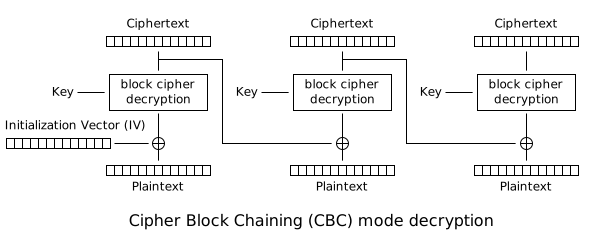
Follow the diagram by supposing that the first ciphertext block is corrupted.
[10pts] Part 7: Chosen Ciphertext Attack on the CBC Mode
You are given part7_py.txt.
$ ./part7.py
The target ciphertext is
iv: 81109c7dff291f6c57f0d6479a334ac8
ct: c892dfdcdaead56d88fbfebac7142442c0fdc499ff0694983d4cd251afd32fb0da6595f66d3e5fb091b7a0f0f18ad9b5


=============
Menu: 0 (encrypt), 1 (decrypt), 2 (open): 0
msg to encrypt in a hexstring format: 11223344aabb
iv: a681a0c60ae6fab05f9f1762d3de9ed5
ct: 36be519e0bf9a9fe84e3d51323925195

=============
Menu: 0 (encrypt), 1 (decrypt), 2 (open): 1
iv (in hexstring): a681a0c60ae6fab05f9f1762d3de9ed5
ct (in hexstring): 36be519e0bf9a9fe84e3d51323925195
decryption is:
    b'\x11"3D\xaa\xbb'

=============
Menu: 0 (encrypt), 1 (decrypt), 2 (open): 1
iv (in hexstring):  81109c7dff291f6c57f0d6479a334ac8
ct (in hexstring):  c892dfdcdaead56d88fbfebac7142442c0fdc499ff0694983d4cd251afd32fb0da6595f66d3e5fb091b7a0f0f18ad9b5
Cannot decrypt the target ciphertext!

=============
Menu: 0 (encrypt), 1 (decrypt), 2 (open): 1
iv (in hexstring):  a7bdcc39485abc97f1e20e372e08bfa1
ct (in hexstring):  1216c53c503147f45eb6e970a90ba959
decryption is:
    b'Hello World'

=============
Menu: 0 (encrypt), 1 (decrypt), 2 (open): 2
The message was:  b"Don't use ECB. It's not IND-CPA secure"
Your Task
As with part 5, make a guess of the secret message before the program
opens it in the end.
Tips
Deliverables
In the report, describe your attack.
- Run part7.py.
- Explain your work: How did you guess the secret message before
giving the "open" command to the program.
Submit
Write a project report.
- Use the project report template for your
report.
- For each part, give detailed explanations and your work to get good
credits. The writing quality of the report matters.
- For some parts, autotest cases are provided in the submission server.
~/bin/submit -c=IT430 -p=project project_report.doc project.py
