Topics to Cover
- cin.get()/fin.get() does not skip any whitespace character
- Static arrays
cin.get() and fin.get()
The function as the following prototype:
int get();
- The function reads a character from the input and returns the
ASCII code of the letter.
- More importantly, it will also read whitespace
charcters.
Consider the following programs:
| ex.cpp
| ex2.cpp
|
#include <iostream>
using namespace std;
int main()
{
  int N = 10;
  char* A = new char[N];
  for(int i=0; i < N; i++)
    cin >> A[i];

  for(int i=0; i < N; i++)
    cout << A[i];
  cout << endl;

  delete [] A;
  return 0;
}
|
#include <iostream>
using namespace std;
int main()
{
  int N = 10;
  char* A = new char[N];
  for(int i=0; i < N; i++)
    A[i] = cin.get();

  for(int i=0; i < N; i++)
    cout << A[i];
  cout << endl;

  delete [] A;
  return 0;
}
|
$ ./ex
* *   *   *    *    *  * * *  *
**********
|
$ ./ex2
* *   *   *    *    *  * * *  *
* *   *
|
Where would it be useful?
In your project!.
You will need to read a map data where a blank means a lot.
Static Arrays
Dynamic arrays vs static arrays
Creating an Array of 6 ints |
| Static Array |
Dynamic Array |
int A[6];
|
int* A = new int[6];
|
| Increase the size of the array to 10 |
Not possible.
|
int* B = new int[10];
for(int i=0; i<6; i++)
  B[i] = A[i];
delete [] A;
A = B;
|
|
There are two types of arrays in C++:
-
Dynamic arrays: What we've seen so far. The size of the arrays can
change from run to run of the program.
-
Static arrays: Once created, the size of the array cannot be changed.
- Using the array after its been created is pretty much the same for either.
- The array cannot be too large. For example, you cannot create an array of
10 million integers.
|
Here's a simple toy program that uses a static array.
#include <iostream>
using namespace std;
void foo(int n);

int main()
{
  int n;
  cin >> n;
  foo(n);

  return 0;
}

void foo(int n)
{
  cout << "Enter " << n << " numbers: ";

  int A[n];
  for(int i=0; i<n; i++)
    cin >> A[i];

  cout << "The numbers in reverse: " << endl;
  for(int i=n-1; i>=0; i--)
    cout << A[i] << " ";
  cout << endl;

  // control_point_1
}
|
|
~$ ./a.out
4
Enter 4 numbers: 1 3 0 7
The numbers in reverse:
7 0 3 1
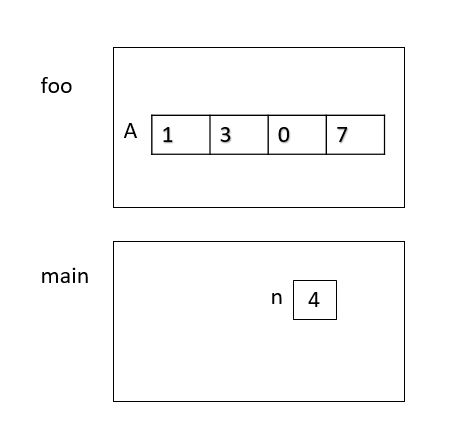
Diagram of the program state at control_point_1
|
Q: For a static array A, do you have to delete []
A;, when you don't need it anymore?
No. As shown in the above diagram, the array is inside the stack frame
of function foo(). When foo() returns, the entire array will be discarded
automatically.
Using Static Arrays in struct Definitions
Anything you can do with static arrays you can do with dynamic
arrays, and then some. However, in some instances, using static arrays
is simpler. For example,
Difference between dynamic and static arrays
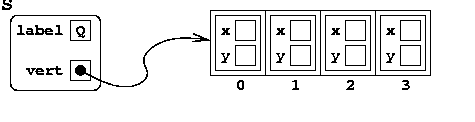
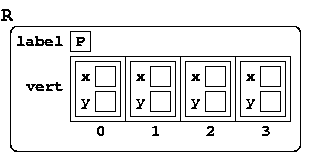
Note the main difference between dynamic and static arrays:
| Dynamic version
| Static version
|
// struct definition
struct Quad
{
char label;
point* vert;
};
// creating a Quad variable
Quad S;
S.vert = new point[4];
|
// struct definition
struct Quad
{
  char label;
  point vert[4];
};
// creating a Quad variable
Quad R;
|
|
|
In the dynamic version, the pointer (instead of the array) is embedded
in the Quad object; the array is outside of the Quad object,
somewhere else in memory.
|
In the static version, the entire array vert is embedded in the
Quad object.
|
Q: Can you change the contents of a static array?
A: Of course, yes
Quick check
Let's look at one example to see what consequences arise from this picture.
Q:
Consider the following code.
Quad S;

//===========
Quad R = S;
R.label = 'P';
for(int i = 0; i < 4; i++)
  R.vert[i].x++;
//===========

// control_point
|
Suppose that S contains:
- the label
'Q' and
- the vertices
(0,0) (1,0) (1,1) (0,1)
Give a diagram at control_point when Quad is defined
according to the dynamic version and the static version.
Answer: dynamic version and static version.
Mandatory Practice Problem
Drawing a picture (possibly flipped). See apple.txt
Note:
For this task, you need to read each individual character including
whitespaces. fin.get() will do the trick. It will return the
ASCII code of a character you read.
File draw.cpp containing the main function is given to you:
// draw.cpp
#include <iostream>
using namespace std;
#include "pic.h"

int main()
{
  Pic pic = load();

  string cmd;
  while( cout << "> " && cin >> cmd && cmd != "quit" )
  {
    if( cmd == "show" )
      show(pic);
  }

  unload(pic);

  return 0;
}
Write pic.h and pic.cpp so that your program runs
exactly as the sample run on the right.
Solution: pic.h and pic.cpp.
|
|
$ g++ draw.cpp pic.cpp -draw
$ ./draw
filename: apple.txt
> show


                          $$$$
                        $$$$$$
                       $$$$$$
                       $$$$
                       $$
          $$$$$$$$$$$$$ $$$$$$$$$$$$$
       $$$$$$$$$$$$$$$$$$$$$$$$$$$$$$$$$
     $$$$$$$$$$$$$$$$$$$$$$$$$$$$$$$$$$$$
    $$$$$$$$$$$$$$$$$$$$$$$$$$$$$$$$$$$
   $$$$$$$$$$$$$$$$$$$$$$$$$$$$$$$$$$
  $$$$$$$$$$$$$$$$$$$$$$$$$$$$$$$$$$
  $$$$$$$$$$$$$$$$$$$$$$$$$$$$$$$$$
  $$$$$$$$$$$$$$$$$$$$$$$$$$$$$$$$$
  $$$$$$$$$$$$$$$$$$$$$$$$$$$$$$$$$$
   $$$$$$$$$$$$$$$$$$$$$$$$$$$$$$$$$$
    $$$$$$$$$$$$$$$$$$$$$$$$$$$$$$$$$$$
     $$$$$$$$$$$$$$$$$$$$$$$$$$$$$$$$$$$$$
      $$$$$$$$$$$$$$$$$$$$$$$$$$$$$$$$$$$
       $$$$$$$$$$$$$$$$$$$$$$$$$$$$$$$$$
         $$$$$$$$$$$$$$$$$$$$$$$$$$$$$
           $$$$$$$$$$$$$$$$$$$$$$$$$
             $$$$$$$$$$$$$$$$$$$$$
               $$$$$$$$  $$$$$$$
> quit
|

