Topics to Cover
- Function prototypes
- Function definitions
- Function calls
- Input parameters vs arguments
- Multi-paramter function
- Order of arguments and types of arguments
Motivating Example: Code reuse
Sometimes there is a particular chunk of code that appears over and over
again in a program. For example:
- If we're writing a program to compute gcd's, we'd ask the
user twice to enter in a positive number. This
program illustrates how we'd have to do it.
There are plenty of nice functions in standard libraries, like
sqrt and cos that do all sorts of nice things
for us. If only there were a function getposint that would
get a positive int from the user and return it to our program, we could
rewrite our program as:
int main()
{
  int a = getposint(), b = getposint();

  // Compute gcd
  while(b != 0)
  {
    int r = a % b;
    a = b;
    b = r;
  }

  // Write out gcd
  cout << "The gcd is " << a << endl;

  return 0;
}
This is a tremendous improvement! Unfortunately, such a
function is not a part of any of the standard libraries.
Therefore, it's up to us to make it!
Prototypes
You should have noticed when looking at documentation for the
cmath library that they give a description of the function
like:
double cos(double x);
This is called a prototype.
//  double           cos      ( double  x );
// \______/         \___/       \________/
// return type  function name  input parameter
|
| The prototype tells you (and it tells the
compiler):
|
Prototype of a user defined function
When you define functions of your own, you need to define a
prototype as well. In particular,
- It must be defined outside of the
main block.
- It must appear before you ever use the
function.
Now, in the getposint function we'd envisioned earlier,
there's nothing that the function takes as input from the program, and it
should evaluate to or return the positive integer it's read in from the
user, so the right prototype would be:
int getposint();
Function Definitions
In addition to giving the function prototype, you have to provide a
function definition.
A function definition tells the computer what the function is supposed
to do.
The function's definition can appear anywhere
after the prototype outside the main block.
- You repeat the prototype (without the ';').
- Then, give a block of code (i.e., enclosed by { and } ) that comprises the function.
- Just as the
return statement in main leaves the program, a
return statement in your function body leaves the function.
- Instead of
returning 0 however, we'll return whatever value
the function's supposed to give.
The definition of our getposint function
is given on the right.
|
int getposint()
{
  int k;
  cout << "Enter a positive integer: ";
  cin >> k;
  while(k <= 0)
  {
    cout << "I said *positive*, try again: ";
    cin >> k;
  }

  return k;
}
|
The function definition also has to appear outside of the
main block. This program gives a
complete picture of how to rewrite our GCD calculator to make use of a
getposint function.
Function call
You need to understand prototypes to understand how expressions that involve
function calls are evaluated.
For example:
cos(45)/2
What happens here?
-
cos(45) is a function call.
- Recall the prototype of function
cos().
double cos(double x);
Since cos takes a double object as input, the integer 45 is
converted to double 45.0.
- Evaluating
cos results in a double object as specified
by the prototype.
- Since cos returns a double object, the integer 2 is promoted to a double
2.0 before division.
- We get double division and a double result.
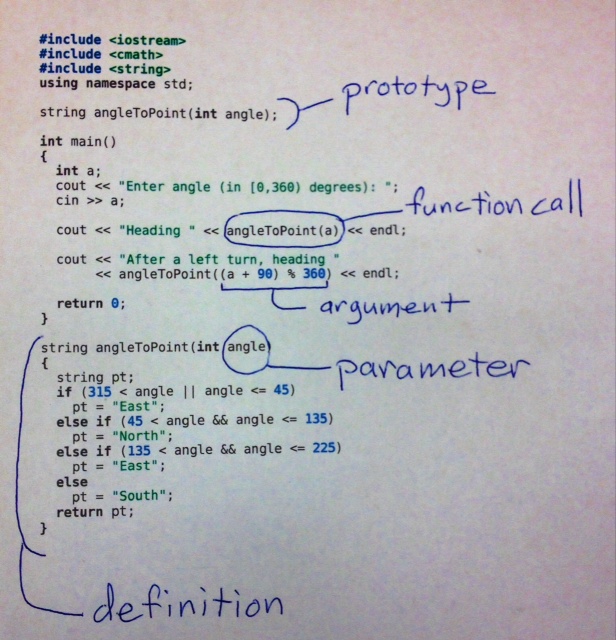
Input parameter vs. argument
In many cases, functions take arguments, i.e. some kind of input
object. For example, we may often be in the situation of having to compute
something like the factorial of a number.
First, we need a prototype that specifies that our function (we'll call it
factorial) takes an integer value and returns an integer value:
int factorial(int x);
| Input parameter: what's in a function definition
(or prototype) | Input argument: what's in a function call
|
From this point on in our program we can use the factorial
function. However, somewhere along the way we'll actually have to
define the function as follows:
int factorial(int x)
{
  int f = 1;
  while (x > 0)
  {
    f = f*x;
    x--;
  }
  return f;
}
This x is called the parameter of
factorial.
Notice that here we give a name to the int value that gets
passed into the function, so that we can reference it within the body of the
function definition.
|
The actual objects that get passed in to a function in C++ are called function
arguments.
For example,
int y = factorial(4);
In the above, 4 is the argument used in calling
factorial.
|
Multi-Parameter Functions
Functions get infinitely more interesting when they have more than
one argument or parameter. Specifying multiple parameters for a
function is just like specifying several single parameters in a
comma-separated list.
For example, suppose you wanted to define a function
max that looked at two ints and returned the
larger of the two. It's prototype would be
int max(int, int);
The definition would look like this:
int max(int a, int b)
{
  if (a < b)
    return b;
  else
    return a;
}
Note that this example shows you that you can return from
anywhere within a function (e.g., it returns b in
the middle of the function definition, if a is less than
b), just like you can return from anywhere within
main.
Order of the Arguments and Types of Arguments
Important: The order of arguments matters.
- The first argument will be passed to the first parameter.
- The second argument will be passed to the second parameter, and so on.
Order of arguments
Consider code below. The function name rep stands for repetition.
That is, it prints the char argument to the screen the
number of times given by the int.
void rep(int n, char c)
{
  for(int i=0; i<n; i++)
    cout << c;
  cout << endl;
}
- If I want to print a
# symbol 42 times, I need to be sure to say
rep(42,'#')
It is because the function expects the int object first.
Types of Arguments
When implicit conversions aren't possible, the compiler gives you an
error message.
Vocabulary
- function prototype -
The prototype tells us what we need to know to use the
function ... everything except what the function actually
does! If you are presented with only a prototype there is
usually some documentation that describes what task the
function accomplishes.
- function definition - This is where we provide the code
that determines how the function operates, i.e. how it does
whatever it does.
- argument to a function - when we use a function ("call" a
function) and we provide an expression whose value will be
passed into the function, that expression is called
an argument to the function.
- function parameter - a function gives a name (and a type)
for the value that is going to be passed into the function.
That name is called a parameter. It's what is
used inside the function definition to refer to the value
that was passed into the function when the function was
called.
- function call - also called application - the point in
the execution of a program at which the function expression
is evaluated and, as a result, the function body executed.
| 
|
- pass a value to a function - this is often how we refer
to the argument that a function receives when it is called.
- pass-by-value - see above. Describes the basic function
calling mechanism for C++, in which the function receives a
copy of whatever argument object appears where the function
is called, not the actual argument object itself.
- function call site - the location in the source code of
the expression that uses the function.
Note: Often we say "function call" when we mean "call
site". It just requires some context. When we are talking
about a location or a specific expression in the source
code, we mean "call site". When we are talking about
something that happens while the program is executing, we
mean "call".
- function's return value - also called result - the object
that results from evaluating the function call expression.
Mandatory Practice Problems
Complete the following code so that it runs correctly.
int main()
{
  int a = getposint(), b = getposint();
  cout << "The gcd is " << gcd(a,b) << endl;
  return 0;
}
solution.
Other Practice Problems
- Marathon Times
- Date Calculator
- Approximating e
- Adjective Endings for Numbers
- Writing zip codes in words