Virtual Memory
- Background
- Once we have a paging system set up, we can note that not
only do processes not have to be contiguous, they don't even
have to all be in memory.
- We can swap less frequently used pages to disk while the
process is still running...locality is our friend.
- Also, note that as individual pages of processes are moving
freely back and forth, the distinction between real RAM and disk
breaks down. It appears to the processes that there is one
big swath of memory. That's why we call it virtual memory.
- Page table structure.
- The basic model of the page table operation is similar to
the base register:

- The page table is in RAM because it can't fit in a register,
but the pointer to the page table.
- But we have a problem. If the virtual memory is large (32G
on my machine), and the pages are small (4K in Linux) that means
there are \( 2^{35}/2^{12} = 2^{23} \) potential entries in a page
table. That's 8M.
- So instead of keeping every process's table in RAM, we allow
those to be swapped out to disk too, keeping a much smaller
table in RAM to access it.

- Translation Lookaside Buffer
- This mechanism means that we may end up making two accesses
to physical memory for every address, doubling memory access time.
- To mitigate this, we create a special cache, just for pages,
called the Translation Lookaside Buffer.

- Page size
- How big should the pages be? Too big and there's more
internal fragmentation. Too small and our page tables get too large.
- Additionally, disk I/O is more efficient if the pages are large.
- Experimentally, we have settled on somewhere from 1K to 4K.
- Though one new technique is to have multiple page sizes. The
i7 can handle pages zises up to 1G. Linux will use 4M page
sizes. These "huge" pages are reserved in the kernel and this
must be set at kernel compile time.
- Fetch Policy
- Which page should be brought into memory?
- Demand paging - bring in the page when asked for.
- Prepaging - Bring in the page asked for, plus others near it
on disk, since locality tells us we'll want them soon anyway.
- Placement Policy
- what frame do we put it in? This really doesn't matter for
paging, yay.
- Replacement Policy
- How many frames allocated to each process?
- Do we replace frames in the process that caused the fault,
or do we go after anyone?
- Among the pages that we're considering, which do we pick?
- Note, we can lock frames the kernel has.
- Optimal - swap out page that will be used the most distantly
in the future. Can be proven to be best strategy. Problem:
we don't know the future.
- Least Recently Used. Assume backwards in time is most like
forwards in time. Locality again!
- FIFO - you know. It replaces the page that has been in
memory the longest.
- Clock - each process gets a bit for each frame in the frame
table, called the use bit. When a page is loaded into memory,
it is set to 1. If it is ever accessed again, the bit is set
to 1. All the frames (that could possibly be replaced) are
treated as being in a big circular array. When it comes time
to replace a page, the system starts walking through the
array. If the next process has a 1 use bit, we set it to 0
and move on. If it has a 0, the select that page for
replacement.
- Clock is easier to implement than LRU, but better than FIFO.
- 2,3,2,1,5,2,4,5,3,2,5,2
- We can enhance clock with separate bits for accessed and
modified. Unmodified pages don't have to be
written back to disk!
- Resident Set Size
- How many frams should a process get? Fewer means more
processes in memory, more means fewer. Fewer mean more page
faults, more means fewer. BUT, adding more frames has
diminishing returns because of locality.
- Fixed-allocation: every process gets a fixed amount,
determined at creation-time.
- Variable allocation: processes that have more page faults
are awarded more frames. These both depend on replacement scope...
- Replacement scope: We can decide to either only replace pages
that are from the same process as the incoming one (local
replacement) or from any process: (global replacement).
- fixed, local: just do as we described above, but only choose
from the running process. Hard to get the parameters right at
creation time.
- variable, global: if we just select from any process's
frames, this automatically becomes variable. Problem: we
might reduce the set of the wrong process.
- fixed, global: can't happen.
- variable, local:
- When process runs, give it an initial set (guess). Run
as normal. OCcasionally re-evaluate the allocations.
- Working set model.
Define a working set of a process. Given a time window \( \Delta \) and a time \( t \), the working set \( W(t,\Delta) \) is the pages that were referenced by the process in \( \Delta \) time units before \( t \).

- Remove from resident set pages that are not in working set.
- New page faults now have room to come in without swapping
something else out.
- Impractical, but can be approximated by looking at page
fault frequency. When a page fault occurs, note when the
last one was for that process. If the time is less than a
threshold, add a frame, otherwise swap out pages with use
bit 0 and shrink resident set.
- Load Control- How many processes will we keep in memory?
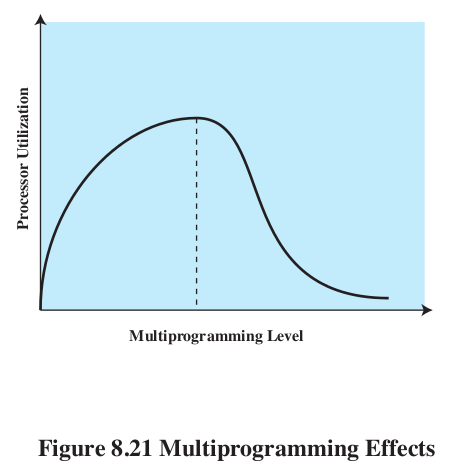
- Thrashing.
- We could implicitly set this policy in the PFF algorithm,
suspending processes with with large page fault times.
- We could adjust the number of processes so that L=S, the
average time between page faults equals the time it takes to
page fault. Turns out that is optimal #.
- Process supension.
- Once we decide that a process should be suspended, which do
we pick?
- Lowest priority
- Faulting process - probably doesn't have its working set
in, so will cause lots of faults, and is about to be blocked anyway.
- last process activated - least likely to have all its
pages in memory.
- Smallest resident set - least future effort to reload
- Largest resident set - frees the most space
- Longest remaining time - lets others finish to make room.
- Linux
- 3 layer addressing.
- Allocating pages - version of the buddy system.
- Once memory is chopped up into free and used frames, it
could take time to find all the frames we need to store the
process. Using the buddy system can help us quickly find an
appropriate hunk of pages.
- Page replacement - Linux uses the clock algorithm, but the
use bit is replaced with an 8-bit age. Increment when you
reference, decrement during clock sweep. 0 gets swapped.
- Kernel memory -