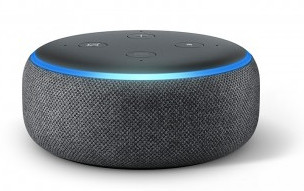
Today's lab will have you create a conversational agent that can hold its own in a user-driven conversation. Similar to Lab 1, you'll read text input from the user, but now that we've learned about loops and if statements, we can create something more interesting.
We want to make a graphical user interface (GUI) so your chatbot is a little more interesting. Install the wikipedia library:
pip3 install wikipedia
To make your life even easier, we have custom chatbot code just for you! Save this file to your lab03 directory and rename it to easychat.py
Create a file called chatbot.py as your program. At the top you usually import the libraries you'll use. Today your library is the easychat.py file you just downloaded, so you can import the "App" object from it like so:
from easychat import App

# This creates an object to hold your GUI in a variable called app
app = App("Name your Bot")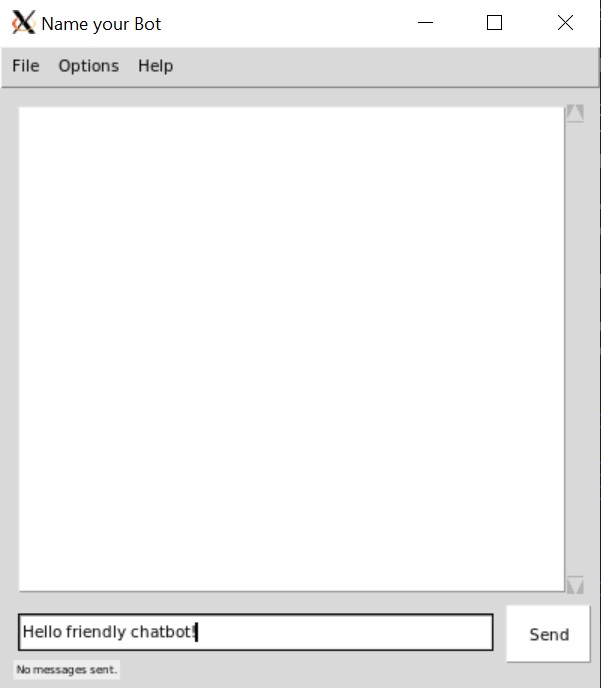
Try running it and you should see a chat box open like the image on the right! Click X to close it:
cd lab03
python3 chatbot.py
How do we use its interface? You now have an app variable which contains your GUI app. It has its own print(str) and input(str) functions just like the terminal ones you are used to. Calling input(str) will wait for the user to type a reply to your string:
app = App("Name your Bot")  # You should give it a name.
reply = app.input("How are you?")
The above will ask the user how they are in the chat screen, and return the string reply they type.
You now have a program chatbot.py. Below are the main lab requirements, but you'll need to read the grey box about string functions before you can do most of it.
When the program starts, give a greeting and get the user's name. Tell them you're pleased to meet the user, printing their name back at them.
Next, your program should begin a sequence of printed messages and retrieved replies from the user that never ends until the user says "bye". What is this sequence? There are certain inputs you will act on (next numeric item), and others you could just keep printing "Tell me more", for instance. The program should end with a farewell like "Goodbye for now!" after the user enters "bye".
Required replies:
Important: string functions
In order to do the above, we need to know a few of Python's basic string testing functions!
String Contains Test: The first and easiest way is to use Python's in operator. You just ask if a string is in another string, and Python returns True or False:
text = "Oranges are my favorite"
if "oranges" in text:
   print("I love oranges!")
But the above won't actually print "I love oranges!". Do you see why not? Oranges is capitalized in the sentence, but not in the test. You often need to lowercase your string values when working with text. After all, we want to match oranges in all cases.
Lowercase a String: Just use the lowercase function that every string value carries around with it.
text = "Oranges are my favorite"
text = text.lower()  # now the text value is lowercased
Capitalize a name: You can capitalize the first letter of each word: "tom hanks" --> "Tom Hanks"
text = "tom hanks"
text = text.title()
String starts with another string: We can test for string contains, but maybe we want to specifically know if a string starts with another string, not just if it contains it. Open a Python interpreter and try this out:
s = "Hello my friend!"
print(s.startswith("Hello"))
print(s.startswith("friend"))
String ends with another string: Same as starts, but on the back side of the string:
s = "Hello my friend!"
print(s.endswith("!"))
Includes another string:
s = "I know many birds."
print( "bird" in s )
Need more? Here is every string function available to you. You are free to use any of these as you see fit.
Copy chatbot.py to chatbot2.py and extend the latter for this part.
Now you will add more interesting functionality. You can ask the real Alexa questions about the world and she answers many of them. But if you pay attention, you'll realize she's plagiarizing like a freshman in high school English class. She quotes wikipedia!
Required: answer any user questions that start with the word "what", "where", or "who" by querying Wikipedia and printing out the first summary sentence of the Wikipedia page.
String manipulation is a common need. You did some string comparison/checking above. Now let's do some string splicing and dicing. For this part, the user will ask you some questions, and you need to pull out the thing they're asking about:
"What is the White House?" --> "the White House"
"Where is New Zealand?" --> "New Zealand"
How to do this? Here are some more string tools, but it's up to you to put them together to make it happen:
str = "What is a navy seal?"

# returns the index of the first space char ' '
i = str.find(' ')

# returns the index of the first space char ' ' starting at the 10th character
i = str.find(' ', 10)

# prints the substring including characters 3-7 (exclusive of 8)
print( str[3:8] )

# prints the substring from character 3 to the end of the string
print( str[3:] )
Your first goal is to "parse" the user's input using the string functions above. Once you get the substring you want, make sure you store it in a variable! A good test is to print it out, maybe parrot it back to the user with a print statement.
Now we're ready to query Wikipedia. In order for you to do this, we will use the Python Wikipedia library to do all the hard work of querying Wikipedia across our internet connection, and send us what we want. You already installed it above. You just need to import the library into your program. Add this line to the top:
import wikipediaFinally, query wikipedia for a sentence from a wiki page's summary paragraph!
summary = wikipedia.summary("Naval Academy", sentences=1)This works because your import statement setup a variable called wikipedia that contains the summary() function.
Try it out right now. After it loads the library and runs, change the wiki query from "naval academy" to something else, and see if it works!
You now know how to query Wikipedia. Your task for this part is to answer "what" and "where" questions with wiki responses. Parse the question to get your search query, and then print the first 1-2 sentences.
In this section we will answer a question directly. For example, "How old is Tom Hanks?". Answer: "63". If you query wikipedia with "tom hanks", you see his birthday in the text, so we can calculate his age based on that. You usually see a birthday for most people searches:
Donald Ervin Knuth ( kə-NOOTH; born January 10, 1938) is an American computer scientist, mathematician,...
Here is your challenge! Parse the string to pull out the birth year, and then calculate how old they are. For this lab, I'll just require you to be correct within one year. Extra credit if you do full date processing to correctly get their age based on the month and day relative to the current date (lookup the python datetime library). Here is the interaction you must implement:
User: How old is Olivia Wilde?
Bot: Olivia Wilde is 35 years old.
The difficulty is that the birth year is in the middle of the text. You must extract it! Notice that the word "born" will almost always be involved, so find that first. Write code to find 'born', and then maybe jump to the closing parenthesis (strings have find() that searches for substrings! See above.).
Important: Your output must have their name, properly capitalized, and no extra punctuation. For instance, this is incorrect:
User: How old is Olivia Wilde?
Bot: Olivia Wilde? is 35 years old.
Ooooh, bonus points if you substitute the name with the correct pronoun. Instead of "Olivia Wilde is...", you output "She is..." (but then "He is..." for men).
Try answering population questions. For example, "what is the population of X?". If you query the wikipedia engine with the phrase "population of X", you actually get a page about the population! Try it out with 3-4 sentences instead of just 1. Here is the "population of canada":
Canada ranks 38th by population, comprising about 0.5% of the world's total, with over 37 million Canadians as of 2019. Despite being the fourth-largest country by land area (second-largest by totalarea), the vast majority of the country is sparsely inhabited, with most of its population south of the 55th parallel north and more than half of Canadians live in just two provinces: Ontario and Quebec.
The difficulty is that the population is hidden in the text. Try extracting it! Notice that the word "million" or "billion" will almost always be involved. Write code to find that, and then find spaces in front and behind it (strings have rfind() which is like find() but searches in reverse!).
Fun? Hooray!
Submit a readme.txt that lists everything you implemented. For instance, "Completed all parts including age, plus population. For Part 1 my 3 additional interactions are replying to A, B, and C."
Run your program and have a full conversation with it that illustrates all your functionality. Copy and paste the entire run into a text file called conversation.txt
Login to our submit system and submit the following files:
chatbot.py
chatbot2.py
readme.txt
conversation.txt