Imagine you are a social scientist looking to investigate behavior on Twitter, and need to perform a cursory study of what people are talking about online. How would you do it? On Twitter alone, it is estimated that people post over 200 billion tweets each year. Good luck manually analyzing that data!
In today's lab, you will write a basic program to ingest raw tweets, and allow the user to create word clouds of what people write. Your interface will search for words or phrases, and produce a cloud of everything said around that word.
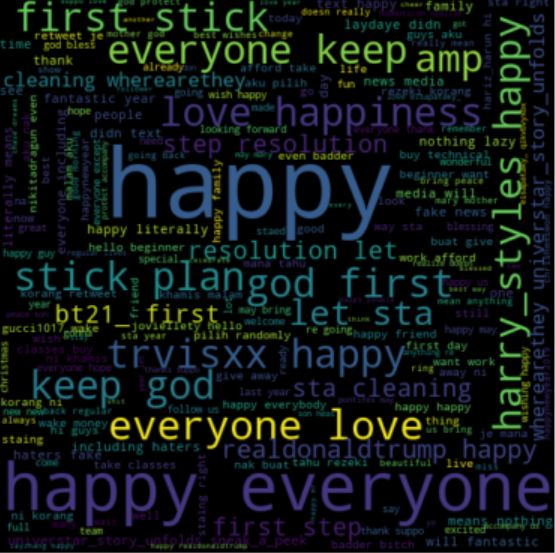
The cloud on the right are the words used with "New Year" on Jan 1 and Jan 2, 2019.
Download 100 tweets, a very small amount. You'll use this for initial testing.
Download a sample of 2 days of tweets from Jan 1-2 2019: 4.8 million tweets. That's half a gigabyte of text, or 285mb zipped up. Do not unzip this, but we'll have your program read in from the compressed zip format.
Word clouds! Install as usual with pip3. You can read about it here:
pip3 install wordcloudLast week we had a CSV-formatted file. This week it's just a big text file with one tweet per line! That's it. Since it is zipped, we want to use the gzip library to read it in your program:
import gzip

with gzip.open('tweets100.txt.gz', 'rt', errors='replace') as f:
   lines = f.readlines()
Create tweets.py and copy the above to it. Just like last week, this code creates a List of strings for you. Each string is a tweet. Try it out! Run it and then add a line to print out one of the lines it just read in for you...perhaps:
print(lines[26]) # try print statements to explore your datatweet_count(tweets, query). Your function should take two arguments, (1) a List of tweets, and (2) a string search query. Your function will return how many tweets that query appears in. In other words, count how many tweets contain the given string query.
build_doc(tweets, query). This function takes the same two arguments as tweet_count. However, this one must return a single string which is the concatenation of all tweets that contain the query string.
If you wrote the above functions correctly, then run the following code with your function definitions. It should work!
with gzip.open('tweets100.txt.gz', 'rt', errors='replace') as f:
  tweets = f.readlines()

print("Seen: ", tweet_count(tweets, 'presents'))
print("Concat: ", build_doc(tweets, 'presents'))
You should see the same output (but all 100 tweets printed):
Seen: 100
Concat: theres like 20 presents under the tree & only one is mine & it is a heater.
rt @fractionai: feels better to give presents than it does to receive them
i feel like the only person who didn't open their presents tonight.
all these presents and you still not mine http://t.co/qjpthuapkq
rt @princess_gf_: i'm so lucky to see the piles of presents in my living room on christmas morning❤️
waiting to wrap christmas presents until christmas eve is crazy! @@) finally done
can we start opening presents yet? 'too early' doesn't exist in my vocab...
rt @fvckcierra_: 12 mins & all the people in my house are going to be opening presents 🎁 lol
probably gunna get up at like 7 to wake up my parents to open presents
about to see so many pictures of presents... and i don't get mine for another 2 weeks...😒
rt @smokingun_: its finally christmas... still can't open presents tho
my parents won't let me go down stairs because of my presents 😂
rt @kayshejamesh: idk how people get all of their gifts on christmas eve. like how do you not enjoy opening presents christmas morning???
rt @birbigs: instead of presents, give your kids "presence." then explain how homonyms can be hilarious. then leave forever.
...
You have a function now (build_doc) that collects all the tweets into one big string. How do we make a word cloud? The friendly Python community has created a Wordcloud library, and all you need to do is call their handy function that inputs a big string of words. This will create a cloud 'object' from your one string, and then you send it to Matplotlib to display.
I'm showing you an example piece of code on how to use the library. Look for the doc variable. In this example, that's the string with all the words in it. You've already used Matplotlib in a prior lab, so some of this code should at least be familiar to you:
# Don't forget your library imports!
import matplotlib.pyplot as plt   # we had this one before
from wordcloud import WordCloud   # new for WordCloud

# The cloud!
doc = "This is a long string with happy words to put in a visual word cloud...blah blah...it makes repeated words bigger than single occurrence words. It splits all the words for you, easy peasy."
cloud = WordCloud(width=480, height=480, margin=0).generate(doc)    # 'doc' is the constructed tweet string

# Now popup the display of our generated cloud image.
plt.imshow(cloud, interpolation='bilinear')
plt.axis("off")
plt.margins(x=0, y=0)
plt.show()
Ok, let's review. The above will create a word cloud from the words in the doc string variable. In Part 1 you wrote a function to make a single string of tweets ... that's perfect for the doc variable!
For this Step 2, you just put your pieces together and add some filler functionality. Change your tweets.py to accomplish this task:
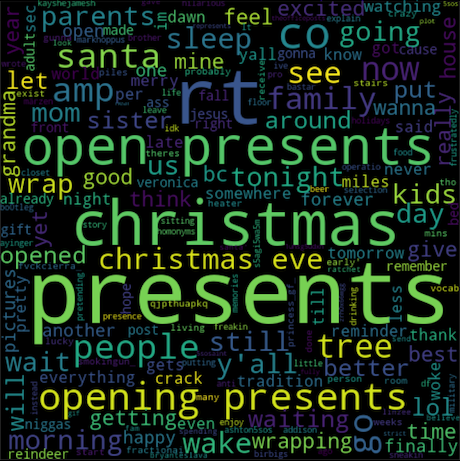
Your cloud for the search query "presents" should look similar to the cloud picture in this Step when run on the small 100 tweet text file. Colors and arrangement may be different.
(this is a short one, hopefully!)
It takes a long time to read the tweets from that big file. Now change your program so that it loads the file once, and then enters a loop where it asks the user for a search query over and over until the user types 'quit'. You may assume the user hits the 'x' button on the word cloud window when they are ready for another search.
If no tweets match the query, your program should NOT crash, and it should NOT try to open a word cloud.
Do NOT reload the tweets file every time around your loop.
Almost done. Now let's clean up the rough edges. This Step of the lab is all about better string creation and matching. You must do the following:
You may have noticed your word cloud contains the search word itself, really big. That's not helpful. Your task now is to write a function called clean_tweet(tweet,query). Before adding each tweet to your big doc string, you should call this function on it to "clean it up". The function should take a string tweet argument and return another string such that:
EXAMPLE:
cleaned = clean_tweet('Wow! Look at these great presents, so many!!! wow...', 'presents')

# Prints: 'wow look at these great so many wow'
print(cleaned)
That's it! You now have a quick way to view what people say about specific subjects. Your final task is to run your program on 3 different INTERESTING search terms (using the BIG tweet file), and save their word clouds. You'll turn these in and explain to me why they are interesting. The cloud at the very top of this page is for "new year".
OMG RT if you liked this lab @NavalAcademy
Your code should have 3 functions. Your program should call all 3 functions at some point. Make sure you have good comments before submitting.
twitter.py: Your code.
3 wordcloud pictures: Submit screenshots of your 3 wordclouds.
readme.txt: Text file that says which Step you completed in full, as well as the 3 search queries and WHY each is interesting. Also, what other terms did you remove from the tweets (Step 4)?
Visit the submit website and upload twitter.py, readme.txt, cloud1.png, cloud2.png, cloud3.png to Lab06 for grading.