
Due: Nov 6
Now that we've covered basic models for neural NLP architectures, this lab will give you a chance to implement an early model based on the Transformer network, called BERT. Most of today's NLP applications boil down to representing text in some high-dimensional space, so the challenge is to convert a passage of text into a single vector that somehow represents its meaning. BERT does just that.
Generative AI: GenAI tools are permitted as code assistants on this lab (but you are not required or expected to use them). Your grade on this lab is based on your overall creativity and novel ideas to improve performance. All GenAI usage MUST be cited in the code through clear code comments.
You may be quizzed about your submitted code. Failure to explain how/why your code is written as it is will result in a drastic reduction of your grade.
Install the neural network libraries, PyTorch and Transformers, along with other helpful tools:
mamba create -n bert
mamba activate bert
mamba install transformers torchvision pandas seaborn scikit-learn nltk conda-forge::gdown conda-forge::protobuf
Setup your PATH to point to these new things:
echo "export PATH=\$PATH:$HOME/.local/bin" >> ~/.bashrc
source ~/.bashrc
Download the reviews dataset that this lab uses:
gdown --id 1zdmewp7ayS4js4VtrJEHzAheSW-5NBZv
You should see reviews.csv downloaded to your current directory.
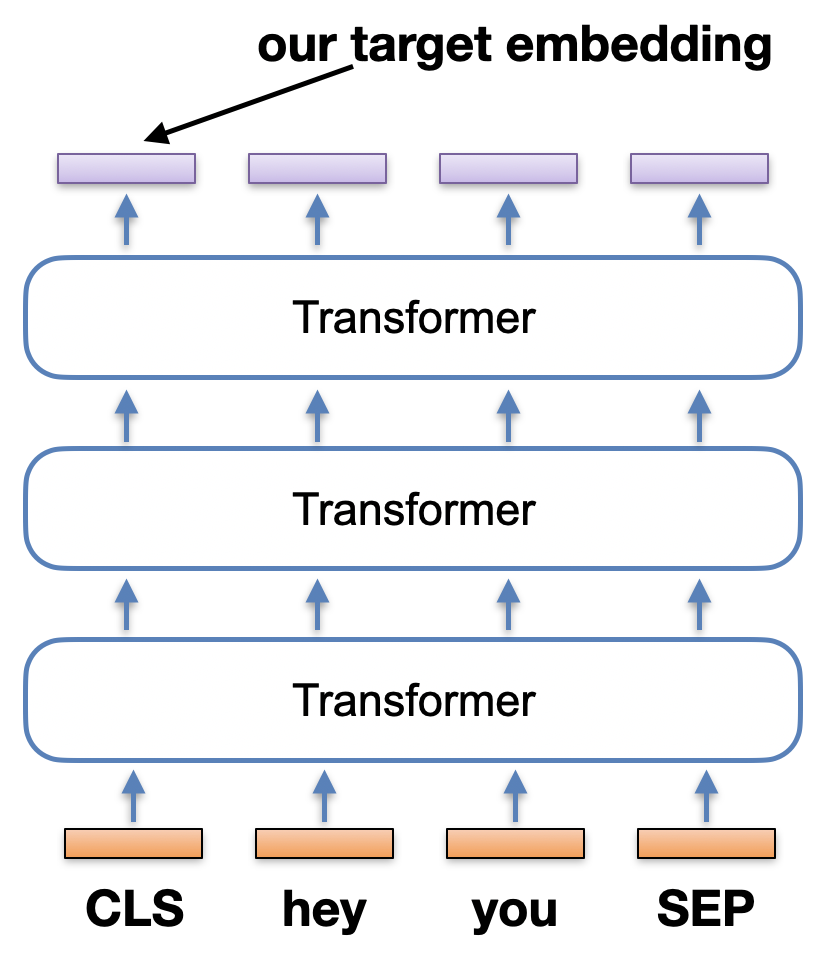
Create a new file and name it mybert.py
Your only goal in this part is to load a pre-trained model, called DeBERTa, and push an example sentence through DeBERTa to output a sentence embedding. Let's recall the BERT pipeline:
Each sentence is prefixed with a [CLS] token, and that token's final transformed embedding represents the entire sentence's meaning. We want to grab that [CLS] embedding output. See the picture to the right for the short sentence input "hey you".
First off, DeBERTa was trained on a large corpus of text, so it obviously has its own tokenizer that converts tokens into unique IDs. You need to make sure you convert your own sentence(s) into IDs so that DeBERTa knows what you're inputting. We load the tokenizer from disk like this:
from transformers import DebertaTokenizer, DebertaConfig, DebertaModel

# Location of the pre-downloaded tokenizer and model
cachepath = "/courses/nchamber/nlp/huggingface"
model_name = 'microsoft/deberta-base-mnli'

# Now load the tokenizer
tokenizer = DebertaTokenizer.from_pretrained(model_name, cache_dir=cachepath, local_files_only=True)
Next, we load the DeBERTa model itself:
config = DebertaConfig.from_pretrained(model_name, output_hidden_states=True, cache_dir=cachepath, local_files_only=True)
model = DebertaModel.from_pretrained(model_name, config=config, cache_dir=cachepath, local_files_only=True)
Now that we have a tokenizer and the model, we just have to know how to use the API to push a sentence through the model. Notice above how we set the configuration to "output_hidden_states". See the picture above again; we want to grab that first vector from the final layer of hidden states.
In the following code, I tokenize a single sentence. I then call the model on that input, and the sentence is pushed through DeBERTa until all hidden states are returned in the outputs variable.
inputs = tokenizer(["this is a sentence"], padding=True, return_tensors="pt")
outputs = model(**inputs)
last_hidden_states = outputs.last_hidden_state[0] # [0] grabs the first sentence in the given list
The above is all you need. Notice the input list around "this is a sentence". You can give it multiple sentences at once, if you wish, and it efficiently processes all of them. The last_hidden_states is a LIST of final DeBERTa layers, one for each of the input sentences (of all the sentences you gave it, we take index [0] to get the last layer of our "this is a sentence" input. If you just give one sentence like my example here, then the list is of size one, and the first element is the final layer of that one sentence). What is in this final layer? It's the output states from each word at the top level.
Your input tokens come in the bottom, and the same number are output at the top. That's your final layer, where each element of the layer is an embedding of the input token, but contextualized with the entire sentence. Which part of the final layer do we want for our sentence? There are a couple options:
For this lab, take Option 1. Remember that every sentence you tokenize is prefaced by DeBERTa (you don't have to input it) with an additional "CLS" token, and ended with a "SEP" token. Let's do Option 1 so that your sentence embedding is just the CLS output. Below is the start of the 768 length vector of my CLS embedding for "Hello I am delighted":
tensor([ 6.0572e-01, -4.6328e-01, -4.1264e-01,  9.7197e-02,  1.2065e-01,
        -5.3452e-01, -4.0866e-01, -3.9982e-01,  3.8038e-01,  1.0696e-01,
        -2.3885e-01, -6.0322e-02, -4.1908e-01, -3.2394e-01,  3.6521e-01,
        -1.3355e-01,  4.6357e-01,  1.4110e-01, -4.7854e-01,  7.4102e-01,
        -3.9421e-01,  7.9315e-01,  4.5145e-01, -2.0742e-01,  1.8394e+00,
         1.5968e+00,  2.4208e-01, -8.8709e-02,  1.6225e+00, -1.3741e-01, ...
Write a function embed_sentence(str) that takes one sentence and returns the above vector. Print out the returned vector. Run a test for "Hello I am delighted" and match my above output. Notice my output is one tensor [] not multiple brackets [[ ]]. You want to grab just the CLS token from the front.
After Part 1, you now have a simple function embed_sentence(str). Now that you can convert sentences into DeBERTa embeddings, you can make a useful data exploration program.
Create a new program called cluster.py
Your task is to take the short online reviews about a phone app, and cluster them to discover the main topics that reviewers discuss. Pretend you're an analyst for a startup company, and you need to know how your app is doing.
Download my data.py file that contains two functions:
reviews = get_review_sentences(N=100)    # returns 100 review sentences as a List of strings

# OPTION 1: Runs k-means cluster with hard-coded k-clusters
labels = kmeans(your_numpy_matrix, k=10)   # labels each row with a cluster ID

# OPTION 2: Runs agglomerative clustering that discovers the \# of clusters
import sklearn.cluster
agg = sklearn.cluster.AgglomerativeClustering(n_clusters=None, distance_threshold=0.15, affinity="cosine", linkage="average", compute_distances=True)
labels = agg.fit(your_numpy_matrix).labels_
You have everything you need to create a clustering program. Your Part 1 converts text into vectors, and I just showed you two clustering algorithms. The only missing piece is the technical bit of creating that numpy matrix for the clustering functions:
# Create an empty matrix NxM where M is the length of your embeddings and you have N samples.
your_numpy_matrix = np.empty(shape=(N,M))
# Now fill in all the rows with your DeBERTa embeddings
for i in range(N):
  your_numpy_matrix[i] = ______
You're building a numpy matrix above, so each vector you put in must be a numpy vector. One last detail is that your DeBERTa vectors are coming out with PyTorch, so you'll get a type mismatch. You can convert PyTorch to numpy like:
numpyvec = vec.detach().numpy()Given the above, put the pieces together and write a program that clusters the review text. Your program then needs to print all clusters in order like this:
***** Cluster 7 *****
content
"The app felt good enough for me to buy the yearly subscription
"This App is useless
"Thanks to the developer for your quick response
"This was originally a 5 star app
"Hey
..."
All clusters should print out, and you should pipe your output to a file called clusters.txt.
Run your program on 1000 reviews with either agglomerative clustering or kmeans using 10 clusters.
After clustering and printing them all out, prompt the user asking for a cluster ID. Upon entry, create a word cloud that shows the words from the reviews in their cluster. Make this a loop, so after they close the word cloud, you prompt again and they can continually look at clouds. The interaction should look like this:
python3 cluster.py
***** Cluster 0 *****
...
***** Cluster 9 *****
...

Enter a cluster number [0-9] to view as a cloud: 3
Enter a cluster number [0-9] to view as a cloud: 7
Enter a cluster number [0-9] to view as a cloud: quit
Goodbye!
You just need the WordCloud library:
pip3 install --user wordcloud
Here is how you create and show one word cloud with Python:
# Don't forget your library imports!
import matplotlib.pyplot as plt   # we had this one before
from wordcloud import WordCloud   # new for WordCloud

# The cloud!
doc = "This is a long string with happy words to put in a visual word cloud...blah blah...it makes repeated words bigger than single occurrence words. It splits all the words for you, easy peasy."
cloud = WordCloud(width=480, height=480, margin=0).generate(doc)    # 'doc' is the constructed tweet string

# Now popup the display of our generated cloud image.
plt.imshow(cloud, interpolation='bilinear')
plt.axis("off")
plt.margins(x=0, y=0)
plt.show()
Tip! Make your clouds more useful by removing a few of the common words that appear in all these reviews and clusters, like "app" and "task".
clusters.txt mybert.py cluster.py
Did you run this on 1000 reviews and 10 clusters?
readme.txt: look at your clusters. Many of them are difficult to tell what the theme is, but others are not. Find a few decent clusters (at least 2), copy a few sentences from those clusters into your readme, and give a title to each cluster. If you can't find any good ones and you used kmeans clustering, increase k=10 higher to get more fine-grained clusters.
Upload all to our submission webpage.
submit -c=SI425 -p=lab06 readme.txt clusters.txt mybert.py cluster.py