double x, y; cin >> x >> y;
12.025.0
x gets the value 12.0, y gets the value 25.0.
|
← This "includes" code needed to use the "standard library" iostream.
  Libraries are repositories of compiled C++ code that we can use in
  our own programs. iostream provides input/output functionality.
← This allows us to use shorter names for standard library  objects.
  For example, without this line we have to  write "std::cout" rather
  than simply "cout".  The line is saying "just assume the 'std::'
  part".
← The "main" function.  For now, all our C++ code goes in between
  these { }'s.
← "cout << x" is how we write output.  The right-hand side can be
  almost any expression. "std::cout" is the full name of the output
  stream associated with the terminal.  "cout << endl" sends a
  newline to the output stream.
← A program actually returns a number to the command shell that
  launched it.  Returning 0 is like saying "this program exited
  normally".
|
Some more comments follow:
cout << xcout << "I am " << 44*12 + 3 << " months old!" << endl
cout << (3.55 - 17.017)*(3.55 - 17.017)*(3.55 - 17.017) << endl;This is a bit of a hassle. Normally we would think of first computing (3.55 - 17.017), then taking the resulting value and cubing it. Hopefully we think something like:
We need a variable in which to store the value (3.55 - 17.017)! So we try creating the following program:
#include <iostream>
using namespace std;

int main() {
  x = 3.55 - 17.017;        // The = operator assigns a value to the variable x.

  cout <<  x*x*x << endl;
  return 0;
}
When we compile this, we get an error message like
error line 4: 'x' is an undeclared identifierWhat the compiler is saying is this:
Look at the following statement:
double x;= operator assigns a value to the
variable x.
To make the program work, we write:
#include <iostream>
using namespace std;

int main() {
  double x;                 //declare x as a variable to store doubles
  x = 3.55 - 17.017;        //assign x the value 3.55 - 17.017
  cout <<  x*x*x << endl;   //print out x^3
  return 0;
}
Once x has been declared as a variable of type double, it can be
used in the program just like a normal number, either to print
or to use in arithmetic expressions, like
cout << x*x*x << endl, which does both.
What really goes on here is as follows:
double, and
given the name x.
double x;
x = 3.5;
x = 2.4;
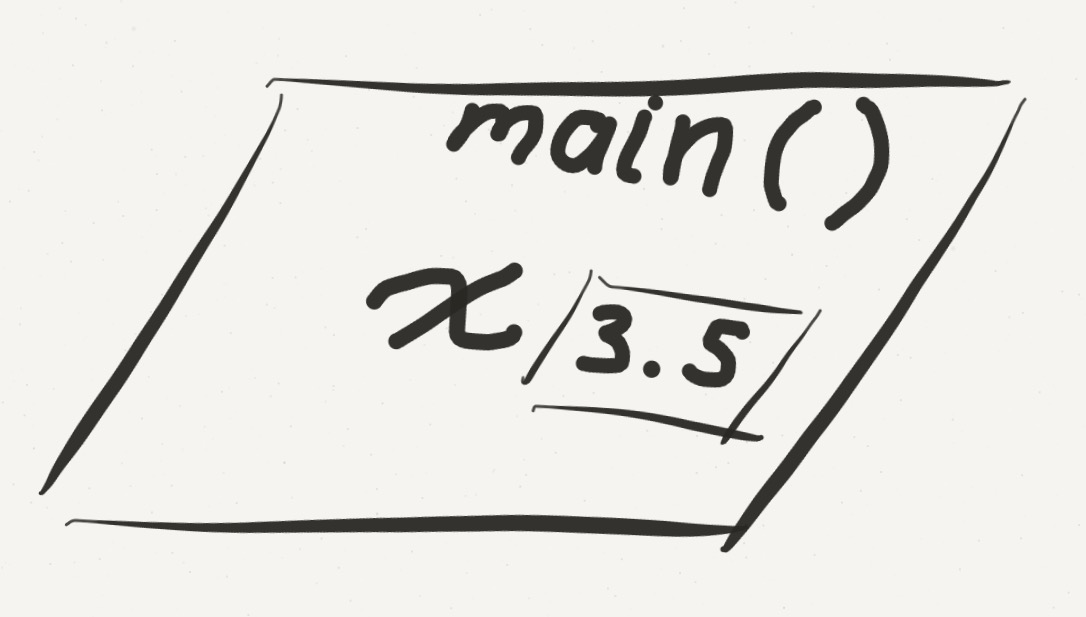 ... make perfect sense. After the statement
 double x;, space
is reserved for x, though we have no idea what actual value is in there -
at this point x is uninitialized. The statement x =
3.5; copies the value 3.5 into the space reserved for x. Finally,
the statement x = 2.4; copies the value 2.4 into the space
reserved for x, thus overwriting the 3.5 that had been there previously.
Think of x as being the name of a box into which
double values can be written.
ISSUE: Good variable names!
cout. In C++ (and in many other places) we refer to an
output stream, the idea being that each thing we write goes out
sequentially in the order we write it. In exactly the same way, we read
from an input stream.
Not surprisingly (given that our output stream is cout) our
input stream object is called cin. [Note: Really it's called
std::cin, but if we use
using namespace std; we may drop the
std:: part. (We usually put the line using
namespace std; after the #include's.) It's defined
in the iostream library, just like cout.]
| Code | double x, y; cin >> x >> y; |
| User Types | 12.0 |
| Effect |
x gets the value 12.0, y gets the value 25.0. |
You may only read into variables, so cin >> 1.5 will cause a
compiler error. (And what would it mean????) When reading into
double x, cin skips any spaces, tab's, or
newlines until it comes across a number. So, for example:
| Code |
double x, y, z; cin >> x >> y >> z; |
| User Types |
12.0 |
| Effect |
x gets the value 12.0, y gets the value
25.0, and z gets the value 7.1 |
Putting this together, we can construct a very simple program Addition Calculator, which reads in two numbers
from the user and adds them together. Notice that the variable that
contains the sum of the two numbers input by the user is actually called
sum. This is just to enhance the readability of my code. I
could've called the variable "George" and it would've worked just the
same.
ISSUE, again: Good variable names!
double, int,
and return. (A complete list can be found on this page.)
There are also names that you could choose for variables, but which are
already used for important things. Examples of this are
main, cin and cout. The problem
with using such a name, is that it creates ambiguity. For example, what
would happen with the following:
double cin;
cin >> cin;
cin's
refer to your new double and you won't be able to use
cin for reading. As we proceed, it will (hopefully!) become
obvious what cannot be used as variable names.
Answer and answer will be considered different
variable names. A very common mistake that beginning programmers make is
to be sloppy in writing variable names, sometimes using capitals and
sometimes not. It is not good programming practice to use two variable
names that are spelled the same except for capitalization because it leads
to errors. Your source code will be easier for mere mortals to
understand (interpret this to mean the instructor grading your programs)
if you use meaningful variables names.
Now we'll look at several other types, and as the course
progresses we'll look at more and more, culminating with us defining new types
of our own.
It cannot be stressed enough: the idea of type is key to programming,
regardless of the language. As we discuss these types, we'll also go over
some of the operations defined for those types. This list is not
exhaustive.
double (and float)The issue of how to get good and reliable answers when we can only approximate such numbers is the concern of numerical analysis, which is an important field on the border between mathematics and computer science.
The float type is a "smaller", less accurate version of double.
| operation(s) | Comments |
| +,-,*,/ | all more or less work as you'd expect |
cmath | Use cmath for other
typical mathematical operations. Remember #include
<cmath>, and remember that all these
operations are in the std namespace.
Here is some
online documentation on cmath.
|
intint stands for integers. This type is the real workhorse of
computing. As with integers, there are no fractions, but unlike integers there
are limits on both the positive and negative ends (in the billions on a typical
PC today).
If you use a number like 65 in your program, it is interpreted as an
int. If you used 65.0, on the other hand, it would be a double.
(Numbers hard-coded into a program like this are called literals.)
| operation(s) | Comments |
| +,-,* | all more or less work as you'd expect |
| / | Division is tricky, since fractions aren't involved. Any
fractional part leftover after division is simply chopped off (truncated). This
leads to some odd "identities". For example:
|
% |
This is the "modulus" operator. a % b returns the remainder when
a is divided by b. So, for example, 5 % 3 is 2. The signs of numbers
change the sign of the result (try 5 % -3, -5 % 3, and -5 % -3).
The % operator is surprisingly important. Please look at the Minutes and Seconds program to see an example of why!
|
charchar stands for character. These are letters, numbers or
stranger things (for example there is a "bell character". Writing it causes
your computer to beep!).
char literals are written inside single
quotes, so for example the char a is written inside a program as
'a'.
'\t', and newline is '\n'.
Operations on char's will be more important later on.
bool
| operation(s) | Comments |
| && | The logical AND operator. For bool's a and b, a && b is true if both are true and false otherwise. |
| || | The logical OR operator. For bool's a and b, a || b is false if both are false and true otherwise. |
| ! | The NOT operator. For bool a, !a is false if a is true and true if a is false. |
The words true and false can be used
in your programs for boolean literal values.
sqrt function, so it includes a brief description of the
cmath library. "Libraries" extend the base C++ language.
cin and cout.
double data type.
 25.0
25.0