Part 1: Converting Currencies
Write a program (
note: name the source code
file
part1.cpp) that converts between Dollars, Euros
and Pounds. The program reads input from the user in the
following format:
Convert amount currency_1 to currency_2
and prints results in the obvious way. Here are a couple of
sample runs:
~$ ./part1
Convert 3.50 Euros to Dollars
~$ ./part1
Convert 3.50 Euros to Pounds
Here are the conversion rates you'll need: 1.00 Dollar is
Euros
and 1.00 Dollar is Pounds.
Submission:
If you're finished before lab ends, please demo for your
instructor. Also submit via the class submit script as follows:
~/bin/submit -c=IC210 -p=lab03 part1.cpp
Part 2: More Currencies
Extend your program from Part 1
(note: name the source code file part2.cpp)
to allow for Canadian
dollars as well (1.00 Dollars US
is Dollars Canadian).
Now the user can't simply put "Dollars" in the input,
it must be either "Dollars US" or "Dollars Canadian".
Here are a couple of sample runs:
~$ ./part2
Convert 3.50 Euros to Dollars Canadian
~$ ./part2
Convert 11.72 Dollars US to Dollars Canadian
Submission:
If you're finished before lab ends, please demo for your
instructor. Also submit via the class submit script as follows:
~/bin/submit -c=IC210 -p=lab03 part1.cpp part2.cpp
Part 3: Going further, Creating output for plotting
It's often nice to write programs that
produce output that's intended for other
programs. You will write a program
(
note: name the source code file
part3.cpp)
that
reads in three points from the user
and prints output that the user can
put in a file to give the program "gnuplot"
to produce a plot
showing the triangle defined by the three
user-input points along with its bounding
box, i.e. the smallest rectangle aligned
with the coordinate axes that contains the
triangle.
Gnuplot is a standard tool for creating plots.
Its input is simply a text file of points, one per line, given
by the point's x-coordinate, followed by a space, followed by its
y-coordinate. Gnuplot will draw a mark at each point, and connect
successive points with segments, as long as they are not separated by
blank lines. Note: this means that drawing a closed figure (like a
triangle) requires repeating the first point at the end of the input.
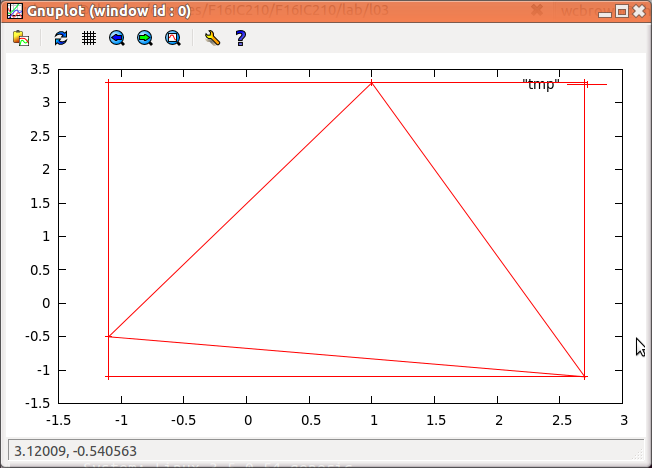
Here's a sample of running the program and using gnuplot to plot
the results. Note: please print the lines defining the bounding
box before the lines defining the input triangle. This is for
automatic grading purposes, not because gnuplot cares.
| sample run |
after copy&pasting output into a new file named tmp ... |
gnuplot's output |
~/$ ./part3
(-1.1,-0.5) (1,3.3) (2.7,-1.1)
-1.1 -1.1
-1.1 3.3
2.7 3.3
2.7 -1.1
-1.1 -1.1

-1.1 -0.5
1 3.3
2.7 -1.1
-1.1 -0.5 |
~/$ gnuplot
	G N U P L O T
	Version 4.4 patchlevel 3
	last modified March 2011
	System: Linux 3.5.0-54-generic

	Copyright (C) 1986-1993, 1998, 2004, 2007-2010
	Thomas Williams, Colin Kelley and many others

	gnuplot home:     http://www.gnuplot.info
	faq, bugs, etc:   type "help seeking-assistance"
	immediate help:   type "help"
	plot window:      hit 'h'

Terminal type set to 'wxt'
gnuplot> plot "tmp" with linespoints; |
|
Submission:
If you're finished before lab ends, please demo for your
instructor. Also submit via the class submit script as follows:
~/bin/submit -c=IC210 -p=lab03 part1.cpp part2.cpp part3.cpp
Part 4: Going even further, Classifying triangles
There are two common ways of classifying a triangle:
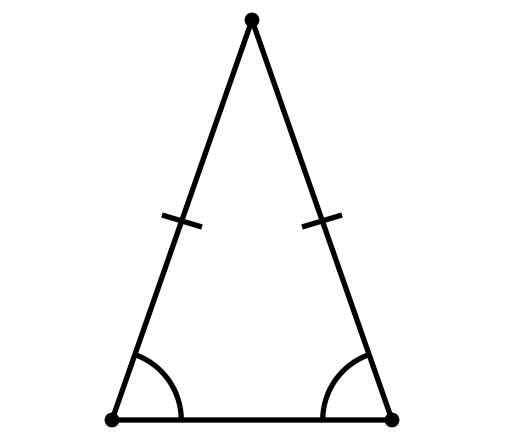
This is an acute isosceles triangle.
-
By describing its interior angles
- Acute triangles have three interior angles that are all
less than 90 degrees
- Right triangles have an interior angle that is exactly 90
degrees
- Obtuse triangles have an interior angle that is greater
than 90 degrees
-
By describing the lengths of the sides in relation to each other
- Equilateral triangles have three sides that are all of equal
length
- Isosceles triangles have two sides that are of equal
length
- Scalene triangle have all three sides of different lengths
A well known property of all triangles is that the sum of any two
sides will always be greater than the third. Given a set of three
lengths it is possible to determine if they can form a triangle by
adding two lengths together and comparing them to the third.
Given the three lengths of the sides of a triangle, a, b and c, it is
also possible to calculate the area of a triangle using Heron's
formula.
$$
\Delta = \sqrt{s(s-a)(s-b)(s-c)} \mbox{, where } s = \frac{1}{2}(a + b + c)
$$
The
cmath library has a function
asin()
that computes the arcsine of an angle. Enter
man asin
on the command line for documentation.
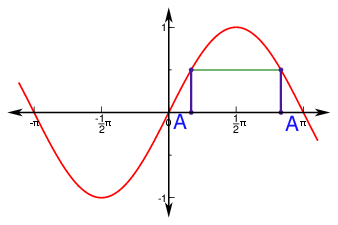
We have a bit of a problem in that for any positive angle $\theta$
less than $\pi/2$, we have that $\sin(\theta) = \sin(\pi - \theta)$.
Thus, when we use $\theta$
= asin(w) for positive
w,
we don't know whether we really want the angle
$\theta$ or $\pi - \theta$.
In our triangle case, we cans fix things like this: if the three
angles we calculate (A, B and C) sum up to a lot less than $\pi$ (in fact, we
should probably check that the sum is less than 3), we replace the
angle opposite the longest side with $\pi$ minus that angle. So,
for example, if $A$ is opposite the longest side, then
we replace $A$ with $\pi - A$.
 BTW:
BTW: as long as you're including
cmath, the
constant
M_PI gives you a high-precision double
representation of $\pi$.
Also: the function
sqrt( ) computes square roots.
part4.cpp)
that reads three lengths from the
user displays the type of triangle that is formed by the input according to
both kinds of classification. E.g. "This is a obtuse scalene triangle"
~/$ ./part4
Enter side lengths: 1 2 3
Error! these lengths violate the triangle inequality!
~/$ ./part4
Enter side lengths: 1.5 2 3
This is a obtuse scalene triangle.
~/$ ./part4
Enter side lengths: 2 2 3
This is a obtuse isosceles triangle.
~/$ ./part4
Enter side lengths: 2 2 2
This is a acute equilateral triangle.
~/$ ./part4
Enter side lengths: 2 2 1.5
This is a acute isosceles triangle.
Submission:
If you're finished before lab ends, please demo for your
instructor. Also submit via the class submit script as follows:
~/bin/submit -c=IC210 -p=lab03 part1.cpp part2.cpp part3.cpp part4.cpp