The VM and your CS Department Home Directory
You're going to be writing and running a lot of programs this semester, so the question of where to do this work is important, as is the question of where to store it. We'll take some time in class to address that question.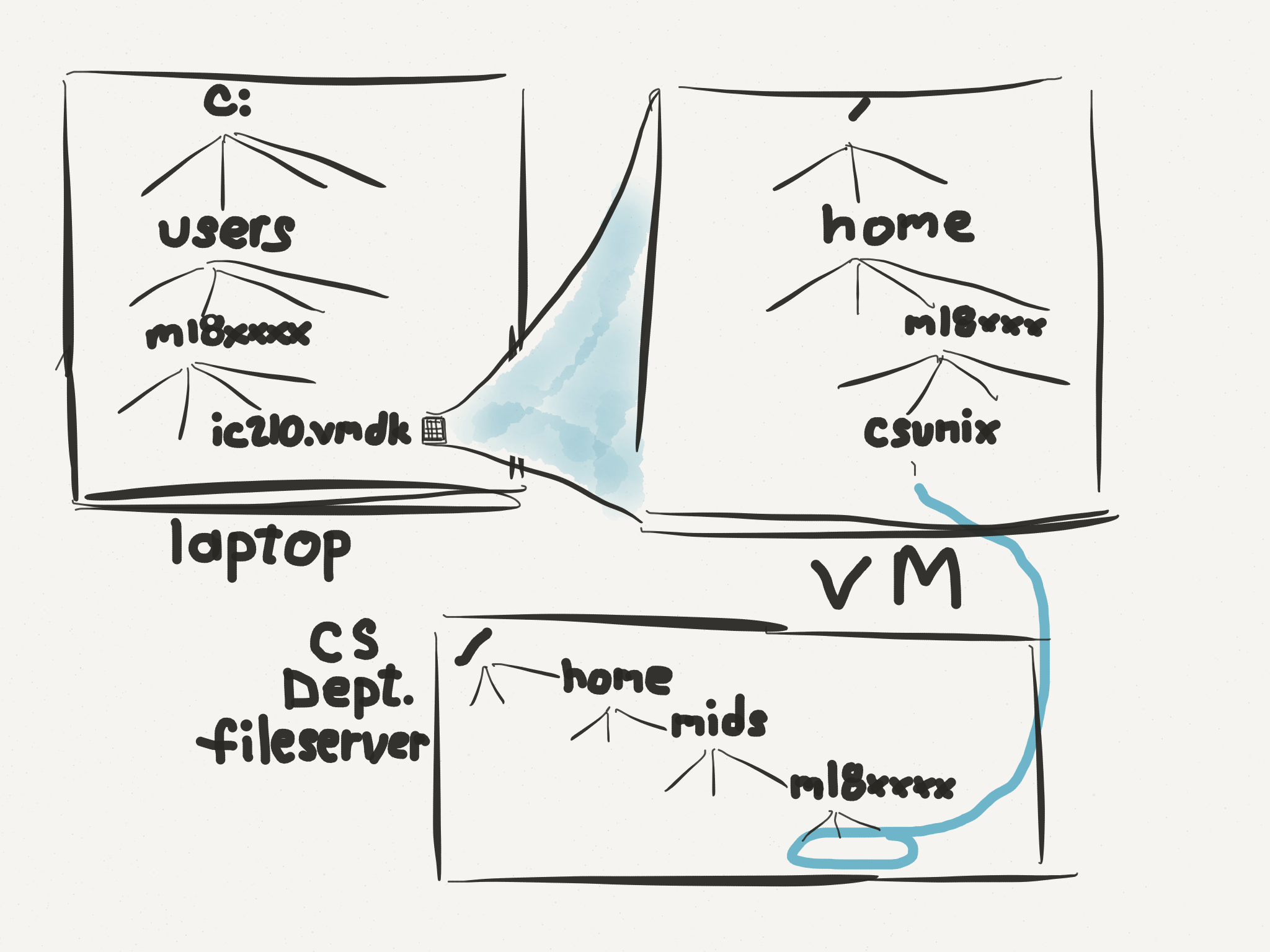
- Where to work. You will be writing and running your programs either on the CS Department Unix lab machines, or on the VM you've installed on your laptop. You will probably want to bounce back and forth - work on something in the lab, continue work on your laptop VM later.
-
Where to store your work.
You have three basic places to store files
- your laptop's filesystem,
- your VM's filesystem, or
- your CS Department home directory.
Storing stuff on your VM's filesystem is nice in some ways - you can work regardless of whether or not you have network access, for example. On the other hand, it's got some serious negatives. If your laptop dies you lose all your work. If the file on your laptop that contains the VM's state gets corrupted, you lose all your work. Finally, the work you do in the lab is not available on your VM and vice versa, undless you go back to constantly copying files back and forth. So ...
... storing stuff in your CS Department home directory is the best option. It's backed up nightly, accessible from the computer lab and, thanks to the "csunixmount" script that's preloaded on your VMs, it's accessible from your VM - as long as you have a network connection.
-
Warning! If you "pause" your VM before exiting VMPlayer (as opposed to shutting the VM down), we recommend you run theOur recommendation. Use the
csunixunmountscript first.csunixmountscript and keep everything in your CS Department home directory.
1. in your VM home directory, give ls command.  Note the directory "csunix".
   Give command cd csunix, then ls.  Note: it's empty.  give cd .. to
   go back to your home directory

2. run csunixmount
   cd to csunix again and do an ls.  Now there's a file README.  Give command cat README
   NOTE: you instructor will explain what's happened and why and recall: cd, ls and cat

3. give command cd ~  (takes you back to your VM home directory)
   give command csunixunmont
   do ls csunix (now it's empty again)
   do csunixmount (files are back!)