Executive Summary
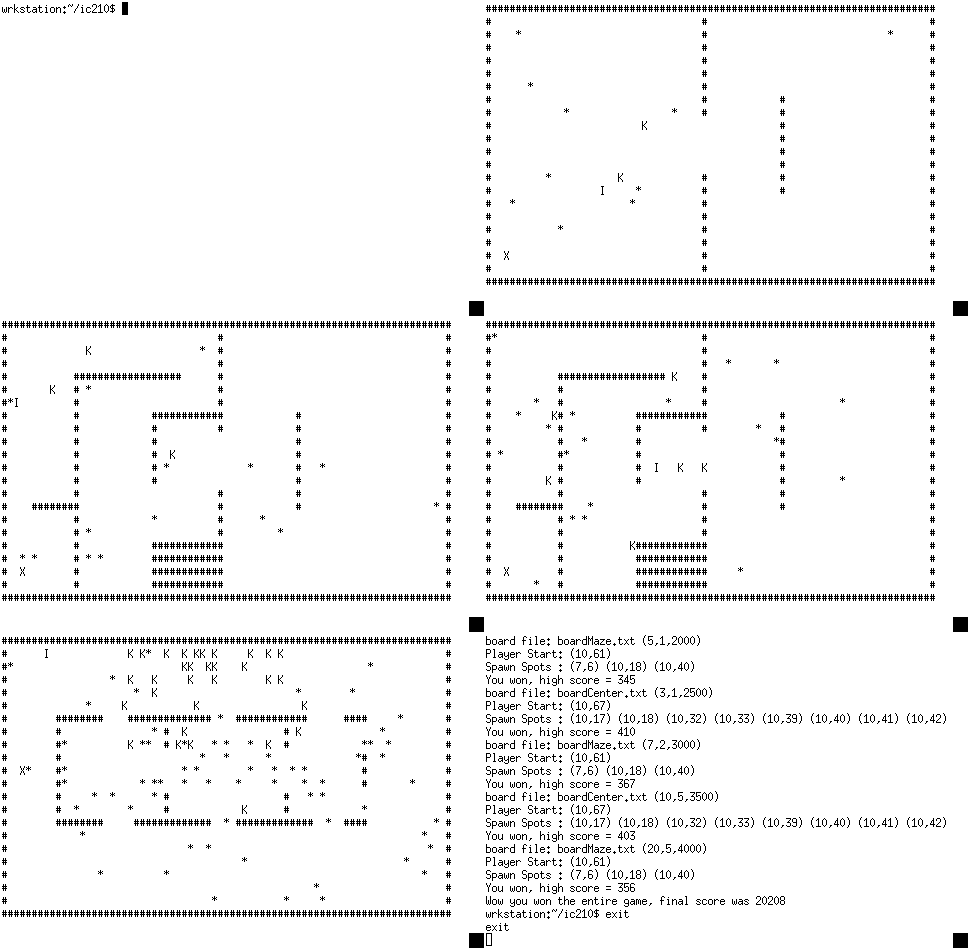
You will be implementing a relatively complex old-school
arcade-style game, which I'm calling "Escape!".
The game will run in the terminal and be based on ncurses, which
you are familiar with from a prior lab. In this game, you are a
player on a game board,
Honor:
The
course policy
and the instructions it references,
most pertinently
COMPSCIDEPTINST 1531.1C,
spell out
what kinds of assistance are permissible for programming
projects. The instructor can give explicit permission for
things that would otherwise not be allowed.
For this project, you have explicit permission
-
to get help from other current IC210 instructors as well
as your own and from current IC210 MGSP leaders (any
assistance must be documented though), and
- to use general purpose C++ resources online (though such
use must be documented).
Resources that might specifically address this project,
say looking through code of programs that implement a
maze-navigation game using
ncurses, are not allowed.
Put the instructions referenced in the course policy and the
explicit permissions above, and what you get is summarized as:
-
The only help you may receive on a project is from your
instructor or the other IC210 instructors and IC210 MGSP
leader, and that help must be clearly cited. In turn, you
cannot provide help to any IC210 students on this
project.
-
In no circumstance - project, homework or lab - may you copy
code and submit it as your own work. That is the definition
of plagiarism.
-
For projects, you may not look at other
people's project code nor may you show your own code to
others.
-
You can look at online resources for general purpose C++
programming, but not for help writing games with ncurses
or anything else that is specific to the functionality
required of your project.
Part 0: My Gift To You ... which you have to accept!
I am providing you with some functions and structs.
They are in the files
Pos.h and
Pos.cpp.
You must use these files, but
you cannot modify them.
Here are several files that the project references, so you
should copy them over into whatever directory you are using to
do your projects:
Note: Please review
Lab 11
That's where you will find the basic ncurses information you'll need.
Important: be sure to check out
further information on
design suggestions!
Part 1: Read the board! [Up to 25pts]
- name the .cpp file containing main() part1.cpp
This part is about reading in the board, and not much else.
Don't do it all at once, break this part into your own smaller steps.
A valid Part 1 solution
Board files look something like this:
10 x 20 1
####################
#                  #
#  Z  ########     #
#            #     #
#####        #     #
#   #        #     #
# X #        #     #
#   #####    #  Y  #
#            #     #
####################
The first line gives number of rows x number of columns,
followed by the number of Z's you'll find on the board.
The X marks the goal position on the board. This is where the
player is trying to get to. The Y marks the player's starting
position.
Zs are "spawn spots". These are
positions that moving, death-dealing objects spawn from.
There can be multiple spawn spots.
Note: Walls are always # characters, and walls always
surround the edges of the board.
-
reads a
filename for board from the user (before ncurses is initialized!);
it must print an error message and return if the file is not
found!
-
reads the board file, and stores the information in it,
then (first initializing ncurses) prints the board on the
screen.
If terminal window is too small, the program must exit
ncurses (by calling endwin();), print an appropriate error
message and exit.
Note 1:
Don't print
spawn spots or player start spot, but do print X for
goal.
Note 2:
You're going to have to read the board with fin.get()
rather than fin >> because you have to
read in the spaces. Don't forget those pesky newlines though!
-
After the board is printed to the screen, go into the loop;
       do {
         usleep(150000);
         char c = wgetch(W);
         if (c == 'y') break; // game exits with a 'y'
       } while(true);
... so that the board stays on the screen until the user
presses y on the keyboard.
After exiting the loop, the program must
exit ncurses (by calling endwin();), and then print out
the row,col coords of the player start spot and the spawn
spots, just so we're sure we've got them right.
Note 3: I strongly suggest you make a struct to represent all
the info you read from the file, and make a separate function
to read in the file and give values to all the members of that
struct.
Note 4: You must split your program into .h and .cpp
files as we have discussed.
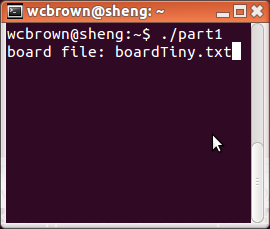 hit enter
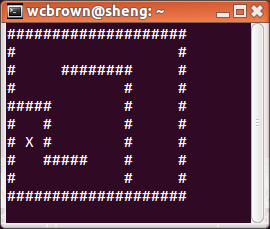 press y
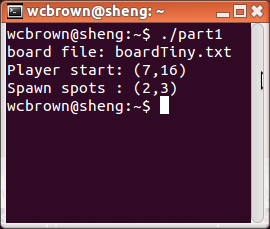
Note: Check out this
video of a running solution.
Important: be sure to check out
further information on
debugging with ncurses!
Part 2 Implement the player! [Up to 45pts]
- name the .cpp file containing main() part2.cpp
A Part 2 solution adds on to the Part 1 solution by implementing
the player — i.e. the figure
in the game that the user controls. Here are the details:
-
The player (represented in the game by a "P") can either be
moving or stopped. It starts the game stopped, and at the
position marked on the gameboard by a "Y".
-
If you like, you can use the arrow keys to move rather
than a,s,d,w. Here's how to do that:
-
Add
keypad(W, true); to the ncurses
initialization code. E.g.
  WINDOW *W = initscr();
  curs_set(0);
  cbreak();
  noecho();
  nodelay(W,true);
  keypad(W, true);
-
When reading keyboard input, store the result of
calling
wgetch(W) in an int, not a char.
So, instead of char kb = wgetch(W); do:
int kb = wgetch(W);
You can still check
for characters like "kb == 'a'", but you
can also compare kb to the constants
KEY_LEFT,
KEY_RIGHT,
KEY_UP,
KEY_DOWN that ncurses defines.
So, for example,
int kb = wgetch(W);
if (kb == 'a') { /* an a got pressed */ }
if (kb == KEY_LEFT) { /* a left arrow got pressed */ }
-
The player bounces off the walls exactly as all the other
game figures (described later) do. I.e. if in a given turn
moving forward would put the player inside a wall (a "#" on the
game board), the game turns the player 180 degrees, stepping in
that direction instead (Unless there is a wall there as
well, in which case remain in the same position but maintain
your direction — the next random maneuver will hopefully
unstick the player).
-
The game stops when the player comes within distance 1 or
less of the X. (Hitting the X exactly can be pain in the neck!)
-
If the game stops because you reach the goal, print out the
player's "score", which is 500 minus the number of
steps (i.e. times through the main loop) it took to get
to the goal.
Note: Check out this
video of a running solution.
Important: be sure to check out
further information on
on bouncing!
Part 3: Implement the stars [Up to 75pts]
- name the .cpp file containing main() part3.cpp
Part 3 adds on to Part 2 by implementing "stars", which are
randomly moving figures (represented by *'s
in the game) that kill the player if they collide with it.
Stars bounce off walls, but simply pass through one another.
Here
are the details:
-
At the start of the game, there are five overlapping stars
on each spawn spot, each with a randomly chosen direction.
-
Just as with the player, stars move one step per round in
their current direction, and they bounce off walls in the same
manner as the player. Colliding stars simply pass through
one another.
-
Every round there is a 1-in-10 chance that the star will turn
before stepping (not counting turning because of walls). This
turn will be a 90deg left turn with probability 1/2, and
otherwise a 90deg right turn.
-
If a star and a player collide, the
player dies (the game should then pause for two seconds,
then exit the program). Here's how to define "collision":
After each object has made its step for the round, we will say
that player P and star S have collided if
P's current position and S's current position are the same, or
both P's current position is the same as S's previous position
and P's previous position is the same as S's current position.
This may seem a bit complicated, but we have to handle the
situation in which P and Q are in adjacent squares and heading
straight for one another. In this case, after one step they will
have crossed, swapping positions. So even though their previous
positions are different from one another and their current
positions are different from one another,
we still want to consider them to have collided.
Note:
Because of this rule, I strongly recommend that whatever struct
you use to represent moving objects actually has a data member that
stores the previous position.
Note:
I also strongly recommend that you implement a cheat —
for instance the i key could make you immortal (i.e. collisions don't kill you). That
makes life a whole lot easier when debugging along the way.
Note: Check out this video of a running solution.
Important: be sure to check out
further information on
on collisions and death!
Part 4: Implement the killers [Up to 85pts]
- name the .cpp file containing main() part4.cpp
Part 4 adds on to Part 3 by implementing "killers" which are
game figures that kill the player on collision but which, unlike
stars, actually track down the player. Here are the details:
-
At the start of the game, there is one killer
on each spawn spot, each with a randomly chosen direction.
- Killers are represented on screen by K
- Killers move (and kill) exactly like stars except that instead of
having a 1-in-10 chance each turn of turning randomly either left or right,
a killer has a 1-in-2 chance each turn of reassessing its direction. When
it does so, it chooses a direction according to the following
rule:
1. let dc = Player column position - Killer column position
2. let dr = Player row position - Killer row position
3. if dc < 0 let cdir = 3 else let cdir = 1
4. if dr < 0 let rdir = 0 else let rdir = 2
5. with prob 1/2 set Killer's direction to rdir, otherwise set Killer's direction to cdir
Note: Check out this video of a running solution.
Part 4.5: Make your own board [Up to 90pts]
This isn't really programming, but you should do it anyway.
Make your own board file, call it boardYYXXXX.txt,
where YYXXXX is your alpha code. Be creative, but make sure
your program still works with your board file as input!
Note: be sure to put walls on all edges!
Part 5: Make it a game [Up to 100pts]
- name the .cpp file containing main() part5.cpp
Part 5 builds on Part 4 to make this a real game: if you die three
times the game's over, you get "points" as you progress,
if you win one board you go on to the next, each
board getting more difficult but worth more points.
Looked at one way, Part 5 is a fairly major rewrite of Part 4.
Looked at another way, if you package your entire Part 4
solution up into a function, Part 5 is nothing more than
calling that function repeatedly. Here are the details:
-
The file gameScript.txt
contains lines like the following:
              ,-|number of stars spawned per spawn-spot
             /
board2Rm.txt 5 1 points = 1000 ←|number of points for winning this board
------------    \
board file name  `-|number of killers spawned per spawn-spot
A player working through the game plays the board as
described by the first line of gameScript.txt
until either dying three times or winning. If the player
wins, the game moves on to the board described by the
second line of gameScript.txt,
and so on and so forth. Nobody except Neo could possibly
finish the entire script, so we don't worry about it.
-
A valid Part 5 solution must read
the gameScript.txt
file completely at the very beginning of the program,
and store the relevant information in it in a linked list.
Yes, it has to be a linked list!
After it's in the linked list you can transfer it into an
array if you want, but you have to read it into a linked
list. Why? Because you don't know ahead of time how many
lines there will be in the file ... and also because I told
you so.
-
After a victory on a given board, your score is the points value
for that board plus 500 minus the number of rounds/steps it took you
to get to the goal.
-
After a victory, restart the game with the next board on the list.
Instead of a fixed value of five stars and one killer per
spawn spot, use the values given in the line
from gameScript.txt.
-
After three deaths at any level, exit but print the total score first.
Note: Check out this video of a running solution.
Extra Credit [+15Pts]
- name the .cpp file containing main() partX.cpp
You may earn extra points by adding on interesting (or difficult
to implement) features to the basic game described in Parts 1-5.
Extra credit will be considered only for correct working
solutions to either Part 4 or Part 5. How much extra credit you
get is at your instructor's discretion. The amount will be
based on creativity, improvement of the game experience, and
difficulty or sophistication of implementation. Using a linked
list as part of your extra features will definitely improve your
chances of getting big points! Here's some extra information
that might be useful in adding extra credit features.
Adding Color
To add color to ncurses we need to start color support
-
Add
start_color(); to your ncurses
initialization code:
WINDOW *W = initscr();
curs_set(0);
cbreak();
noecho();
nodelay(W,true);
keypad(W, true);
start_color();
-
Then we need to initialize colors we want. This doesn't
turn them on yet, but makes them easily available.
init_pair(1, COLOR_RED, COLOR_BLACK);  // Red on Black
init_pair(2, COLOR_BLACK, COLOR_RED);  // Black on Red
init_pair(3, COLOR_RED, COLOR_RED);  // Red on Red (Red Block)
init_pair(4, COLOR_GREEN, COLOR_GREEN);  // Green on Green (Green Block)
-
To actually use colors in plotting use
functions
attron(.) and attoff(.)
like this:
attron(COLOR_PAIR(1));   // Start using Red on Black
wmove(W,10,15);
waddch(W,'X');
attroff(COLOR_PAIR(1));   // Stop using Red on Black
|
Using an extended character set
Full unicode in ncurses seems to be a bit messy. But it
does support a more modest extended character set pretty
nicely:
altcharset chart,
extended
charset chart.
The altcharset has predefined constants like
ACS_CHKBOARD. You write them to the screen
like this:
waddch(W, ACS_CKBOARD | A_ALTCHARSET);
For the extended charset there are simply numeric codes.
If you look at chart you'll see that the copyright symbol
has code 169, so you'd write it like this:
waddch(W, 169 | A_ALTCHARSET);
|
When to submit
Project 3 is due by COB on Thursday, December 8th,
according to the course's particular definition of "COB". Late projects
incur a penalty of 3N points, where
N is the number of business days late. So, a project that is not turned
in by COB Thursday, 8 December, but which is turned in by COB
Friday receives a 3 point penalty.
A project that is not turned in by COB Friday, but which is
turned in by COB Monday receives a 9 point penalty. And so on.
What to submit
Your electronic submission must include:
-
all .cpp and .h files required to compile and run your
program
-
your boardYYXXXX.txt file, your gameScript.txt file and all board files
(e.g. boardCenter.txt) it references, including those that
are linked off this page
-
a file named
README whose first line is the
proper g++ command to compile your project
— the basic project, that is, the furthest Part you
successfully completed without any extra credit.
We will use
this to compile your code, so it better be right!
The following lines should include your name and alpha,
and a description of your game (especially any extra credit
goodies that you've added on).
If you did any extra credit, the last line should be
the proper g++ command to compile your extra credit
assignment.
Your paper submission must include:
- A completed copy of this coversheet on paper.
-
A printout of your README file plus all sourcecode files
(other than Pos.h and Pos.cpp)
needed to compile
your non-extra credit submission,
all done as a single codeprint-generated file!
So, for example, if you completed up to Part 4 and the files
that went into it were named part4.cpp, board.h and
board.cpp,
you would run
codeprint README part4.cpp board.h board.cpp
... and turn in a printout of that. Please make sure that
your name and alpha code appear in at least the README file
(and far preferably in all files!)
How to submit
The paper portions of your submission should be stapled together
and slid under your prof's door. For electronic submission,
continue to use the same method from the previous projects.
Within the directory in which you have been
saving your project, type:
~/bin/submit -c=IC210 -p=proj03 files-to-include
Where files-to-include is a list of all
.cpp and .h files specific to this project, as well as
your gameScript.txt file, README file, the boardYYXXXX.txt file you
created, and all board-files required to run your project.
Submitting more than you need to submit is always
OK. Just be sure
that all the files needed to compile and run your project
(including the extra credit version of your project) are
there. So, assuming you have a directory for this project and
that you are in that directory, you could submit like this:
~/bin/submit -c=IC210 -p=proj03 README *.cpp *.h *.txt
Remember to include the g++ lines used to compile your program
as the first line in the README file, and if you did any extra
credit the g++ line used to compile the extra credit should be
the last line of the README file. You may submit files at any
time, but only the last submission will be used for grading.
How projects are graded / how to maximize your points
Things to keep in mind to receive full marks:
- Submit all required items (as described above) on time.
-
Make sure the form of your output matches the form of the
example output in all
ways.
-
Make sure you follow
the IC210
Style Guide.
This means proper indentation, use of whitespace within
lines of code, logical organization of chunks of code,
-
Make sure you do a good job of putting things in functions,
packaging data into structs, and breaking the program into
.h and .cpp files.
Most important: Look at the the grading sheet.


