
Nimitz Library
Renewing & Requesting Items
Material can be renewed online, in person at the Checkout Desk, or by calling 410-293-6945.
Renewing an Item on Loan
To renew items online: Sign into your Library Account using your USNA ID and password. Under "Loans" you will see a list of items checked out to you. On the right of each item is the option to renew your items.
Items that have already been requested by another user will not be renewed and must be returned on or before the due date. Midshipmen may renew books for 1 year. At the end of the 1 year period they must be returned to the library.Requesting an Item Or Digitization
1. Starting at the usna.edu/library homepage, use the search bar to search for the title you would like to request.
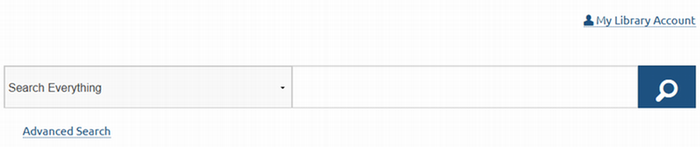
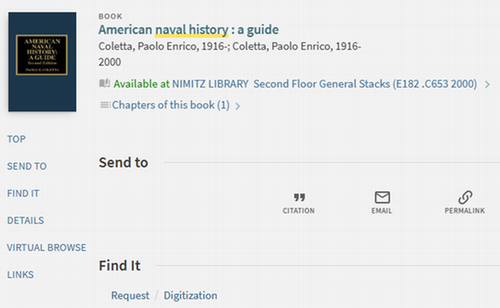
2. Click on the title you'd like to request. Under "Find It", you will see a prompt to sign in, if you haven't already.
3. Once you've signed in, you'll see a link for "Request" or "Digitization".
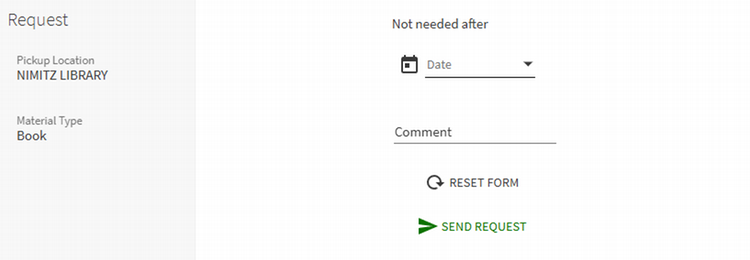
4. Complete the form with the requested information.
5. Wait to receive an email confirmation that your item is ready for pickup or that your item has been scanned, then head to the library Checkout Desk to pickup your requested item(s).
If the item is checked out to someone else already, we will hold it for you when it is returned. You will be notified via email when the item is ready for pick up and will be held for you at the Checkout Desk for 7 days from the date notification is sent.
Not Finding What You Need?
- If you would like to request an item not held by Nimitz please make an interlibrary loan request.
- Recommendations for Items to be added to Nimitz’s Collections can be made here.
